Why Most Websites Don’t Convert — and What to Do About It
Website design for conversion is the practice of building and structuring web pages so that visitors take a specific, measurable action — a phone call, a form submission, a purchase, or a booking.
Here’s the short answer on what actually moves the needle:
- Define one primary goal per page — competing CTAs kill conversions
- Lead with clarity — visitors decide in seconds whether they’re in the right place
- Reduce friction — fewer form fields, faster load times, simpler navigation
- Build trust — testimonials, reviews, and real photos near decision points
- Design mobile-first — more than 60% of web traffic comes from mobile devices
- Test and measure — use analytics, heatmaps, and A/B testing to improve over time
Most small business websites look fine. They have a logo, a services page, an “About Us” section, a contact form buried at the bottom. They were built to exist, not to perform.
That’s the core problem.
A website that doesn’t convert isn’t a digital presence — it’s a digital expense. And the gap between a site that looks good and one that actually generates leads or sales comes down to one thing: intentional design decisions, made in the right order, for the right reasons.
The good news? Conversion-focused design is not magic. It’s a repeatable process — starting with purpose, running through structure and psychology, and ending with measurable results.
This guide walks you through every step.
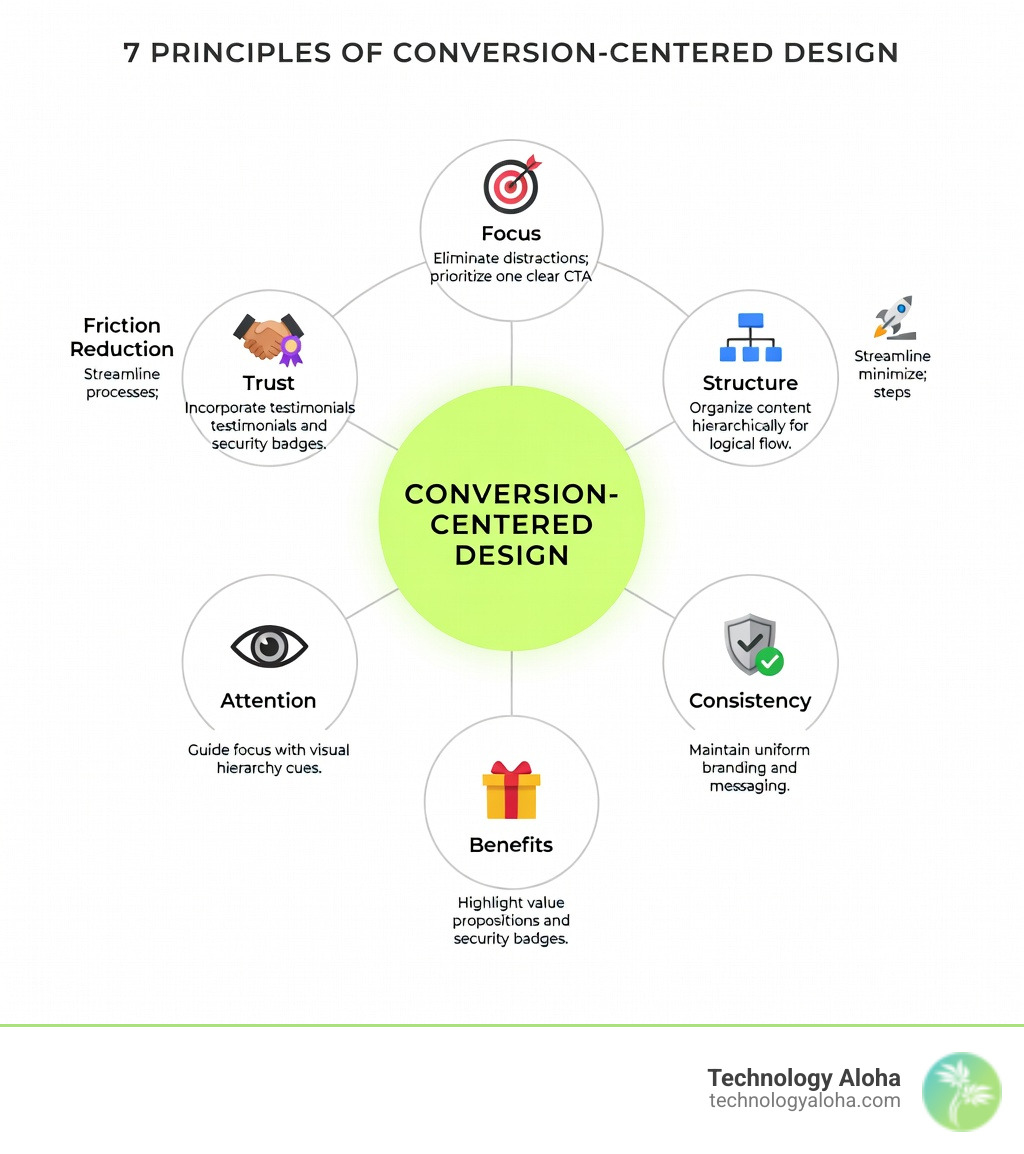
Defining the Purpose of Website Design for Conversion
Before we pick a color palette or draft a headline, we must ask: What is this website actually supposed to do?
If your site disappeared tomorrow, what business outcome would fail? If you are a landscaping company in Kahului, your failure is a lack of phone calls. If you run a boutique e-commerce shop, it’s a drop in transactions. Most websites fail because they try to be everything to everyone, resulting in “brochure-ware” that adds friction rather than solving problems.
To succeed, you must categorize your primary purpose. In the complete guide to high conversion websites, we explore how narrowing your focus is the first step toward a higher ROI.
| Feature | Lead Generation (Service-Based) | E-commerce (Product-Based) |
|---|---|---|
| Primary Goal | Form submission or phone call | Completed purchase/checkout |
| Key Content | Service benefits, testimonials, FAQs | Product specs, reviews, high-res photos |
| Primary CTA | “Schedule Free Quote” or “Call Now” | “Add to Cart” or “Buy Now” |
| Trust Signals | Certification badges, local project photos | Secure checkout icons, return policy |
| Navigation | Focused on service depth and expertise | Focused on category filtering and search |
Translating SMART Goals into Website Design for Conversion
A “better website” is not a goal. It is a wish. To achieve website design for conversion, we use SMART goals: Specific, Measurable, Achievable, Relevant, and Time-bound.
Instead of saying “we want more leads,” a SMART goal would be: “Increase monthly consultation requests from 15 to 30 within the next 90 days.” This allows us to work backward. If we know we need 15 more leads, and our current conversion rate is 2%, we know exactly how much more traffic we need or how much we must improve the conversion rate on the existing traffic.
Once these goals are set, we implement conversion tracking via Google Analytics to monitor every click, form fill, and scroll. Without a baseline, you are just guessing.
The Psychology of the Click: Why Users Convert
Every decision a visitor makes on your site is processed through two cognitive systems. Psychologist Daniel Kahneman calls these System 1 and System 2.
- System 1 (Fast Thinking): This is intuitive, emotional, and automated. It’s the snap judgment a user makes within 0.05 seconds of landing on your page.
- System 2 (Slow Thinking): This is logical, calculating, and takes effort.
High-converting design prioritizes System 1. We want the user to feel—instantly—that they are in the right place. If they have to work too hard to understand what you do, System 2 kicks in, realizes it’s tired, and the user leaves. This is often caused by analysis paralysis or overchoice. When you give a visitor ten different links in the header, they are more likely to click nothing at all.
We also look to The Fogg Behavior Model (BMAP), which states that Behavior (B) happens when Motivation (M), Ability (A), and a Prompt (P) converge at the same moment.
- Motivation: Do they want what you’re offering? (e.g., solving a painful problem).
- Ability: Is it easy to do? (e.g., a 3-field form vs. a 15-field form).
- Prompt: Are you asking them to do it? (e.g., a clear CTA button).
By applying 7 website psychology tips that surprise even the experts, we can leverage concepts like loss aversion—the idea that the pain of losing is twice as powerful as the joy of gaining. A headline like “Stop Wasting Money on Inefficient Cooling” often converts better than “Save Money on Your AC.”
Architecting the High-Converting Sitemap and Navigation
Your website navigation should not look like your company’s internal organizational chart. Your customers don’t care about your internal departments; they care about finding a solution to their problem.
We build “user-intent” sitemaps. This means mapping the top 3–5 questions a prospect has and ensuring the navigation answers them immediately.
- What do you do?
- Can I trust you?
- How much does it cost (or what is the process)?
- How do I start?
Following Miller’s Law, which suggests the human brain can only hold about 7 items in its short-term memory, we limit primary navigation to 5–7 items maximum. Any more, and you trigger the analysis paralysis we mentioned earlier.
In the 3 pages you absolutely need when building your website, we emphasize that every click is a chance for a user to leave. The fewer clicks it takes to reach a conversion goal, the higher the conversion rate will be. Our internal linking strategy ensures that “Tier 1” pages (your main services or products) receive the most internal links, guiding the user’s eye and the search engine’s focus toward the most valuable content.
Visual Hierarchy and the Anatomy of a Converting Page
Visual hierarchy is the arrangement of elements in a way that implies importance. If everything is bold, nothing is bold. If every button is red, no button stands out.
We use the AIDA framework to structure the page:
- Attention: A bold hero section with a benefit-driven headline.
- Interest: Explaining how the service works or the specific benefits of the product.
- Desire: Using trust signals, social proof, and testimonials to prove you can deliver.
- Action: A clear, high-contrast Call to Action (CTA).
When it comes to CTAs, the words matter as much as the color. In our guide on website call-to-action buttons and the best and worst words to use, we note that “Get My Free Quote” almost always outperforms “Submit.”
For product-heavy sites, there are 4 things you need to include on your product pages: high-quality imagery, clear pricing, social proof (like star ratings), and a sense of urgency.
One of our favorite techniques is the containment technique. By placing a CTA or a contact form inside a distinct container—using a contrasting color like #abe080 against a #4d4d4d background—you draw the eye directly to the most important part of the page. It’s visual shorthand for “Look here next.”
Technical Performance: Speed, Mobile, and Accessibility
You can have the most beautiful website design for conversion in the world, but if it takes five seconds to load, no one will see it.
Performance is a conversion pillar. Google’s Core Web Vitals measure three specific things:
- LCP (Largest Contentful Paint): How fast the main content loads. (Target: < 2.5s)
- INP (Interaction to Next Paint): How responsive the site feels when you click something. (Target: < 200ms)
- CLS (Cumulative Layout Shift): Does the page jump around while loading? (Target: < 0.1)
Statistics show that 50% of web traffic now comes from mobile devices. If your site isn’t optimized for a “thumb-zone” experience—where the most important buttons are reachable with a thumb while holding a phone—you are losing half your audience.
Furthermore, accessibility is not just a legal requirement under WCAG standards; it is good business. Designing for the 56 million Americans with disabilities means ensuring high color contrast (at least 4.5:1), keyboard-only navigation, and screen-reader compatibility. An accessible site is a usable site for everyone. For more on this, check our resources on website speed optimization.
The Role of Mobile-First Website Design for Conversion
We no longer design for desktops and “shrink” the site for phones. We design for phones first. This forces us to prioritize the most essential information.
- Touch Targets: Ensure buttons are at least 24x24px so they are easy to tap.
- Sticky CTAs: Keep a “Call Now” or “Book” button at the bottom of the screen as the user scrolls.
- Simplified Menus: Use a clean “hamburger” menu that doesn’t overwhelm the small screen.
Measuring Success and Ongoing Optimization
Launch day is not the end of the project; it’s the beginning of the data collection phase. We use Google Analytics to track conversion rates, but we also go deeper with:
- Heatmaps: To see where people are clicking (and where they aren’t).
- Session Recordings: To watch where users get frustrated or “stuck” in a form.
- A/B Testing: Comparing two versions of a headline or button color to see which performs better.
This data-driven approach is how you get a higher ROI from your paid marketing campaigns. If you are spending money on ads to drive traffic to a site that hasn’t been optimized for conversions, you are essentially pouring water into a leaky bucket.
Frequently Asked Questions about Website Design for Conversion
What is the optimal number of form fields for lead capture?
The general rule is that every additional field reduces your conversion rate. For initial inquiries, 3–5 fields are optimal. If you need more information, use progressive disclosure—ask for the basics (name/email) first, then ask for more details on a second screen. This uses the “sunk cost” psychology; once someone has started the process, they are more likely to finish it.
How does page speed directly impact conversion rates?
A 1-second delay in page load time can result in a 7% drop in conversions. In a world of instant gratification, users associate speed with professionalism. If your site is slow, they assume your service will be slow too. High bounce rates are often just a symptom of a slow server or unoptimized images.
Which platform is best for a conversion-focused website?
- WordPress: Best for most businesses due to its flexibility, SEO power, and vast integration options.
- Webflow: Excellent for high-end custom animations and clean code without the need for many plugins.
- Shopify: The gold standard for e-commerce, built specifically to handle the “cart to checkout” funnel. The “best” platform is the one that allows you to make quick updates and provides the best performance for your specific user base.
Conclusion
At Technology Aloha, we believe that your website should be your hardest-working salesperson. By blending data-driven insights with cohesive branding and website design for conversion, we help businesses in Hawaii and beyond turn casual browsers into loyal customers.
Success isn’t about the flashiest graphics; it’s about the clearest path to action. Whether you are looking for a full redesign or just want to plug the leaks in your current funnel, focusing on the user’s journey is the only way to ensure your digital investment pays off.
Ready to see how your site stacks up? Explore our services in web design and let’s build something that actually works.