What Website Accessibility Means in 2026
Website accessibility means making a site usable for people with disabilities. A practical start is to add useful image descriptions, make menus and forms work with a keyboard, caption videos, and keep text easy to read. Then test important tasks, such as donating or requesting help, with a keyboard and screen reader. Use WCAG 2.2 to guide the fixes.
This matters to every organization, but especially to nonprofits whose websites connect people with services. About 16% of the world’s population lives with a significant disability. An inaccessible form can turn a simple request for help into a dead end.
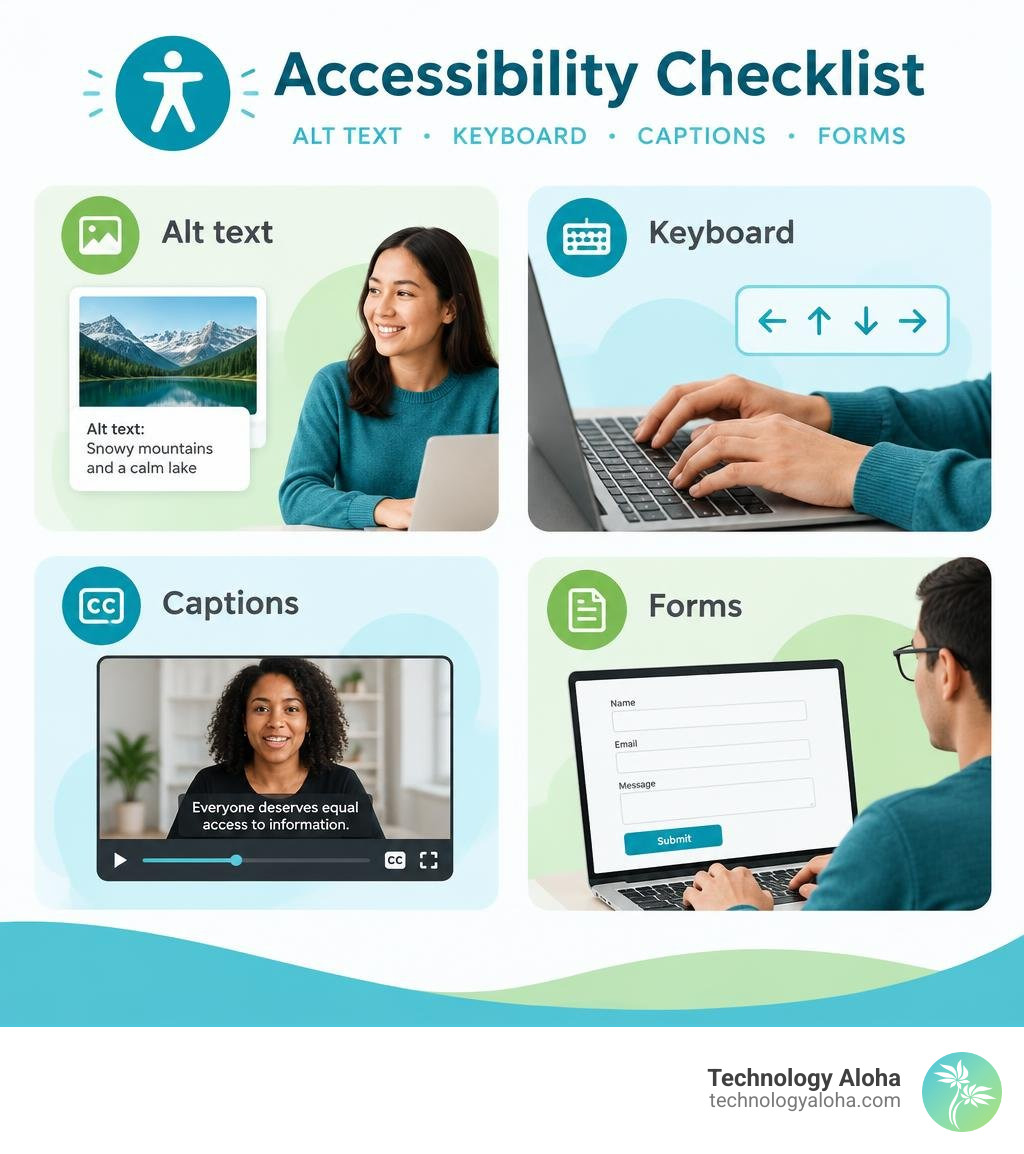
Why Website Accessibility Matters in 2026: Civil Rights, Business Value, and AI Readiness
Digital access is a fundamental civil right. When an online portal lacks keyboard controls or screen reader compatibility, it builds a digital staircase over a public entrance. For public services, community organizations, and businesses alike, an inaccessible design shuts out community members who rely on online portals for essential services.
Beyond civil rights, removing digital barriers directly drives organizational growth. If visitors run into broken forms or confusing interactive elements, they simply leave. When analyzing your digital performance and reviewing Why Your Website Isn’t Converting and How to Fix It, basic accessibility failures are frequently the invisible culprit behind abandoned carts, unsubmitted applications, and lost donations.
Who Benefits from Website Accessibility Across Permanent and Situational Needs
Accessibility features benefit far more than just visitors using specialized assistive hardware. Digital needs fall along a broad spectrum:
- Permanent disabilities: Blindness, low vision, profound hearing loss, motor control challenges, and cognitive variations require stable support for screen readers, braille displays, switch devices, and keyboard navigation.
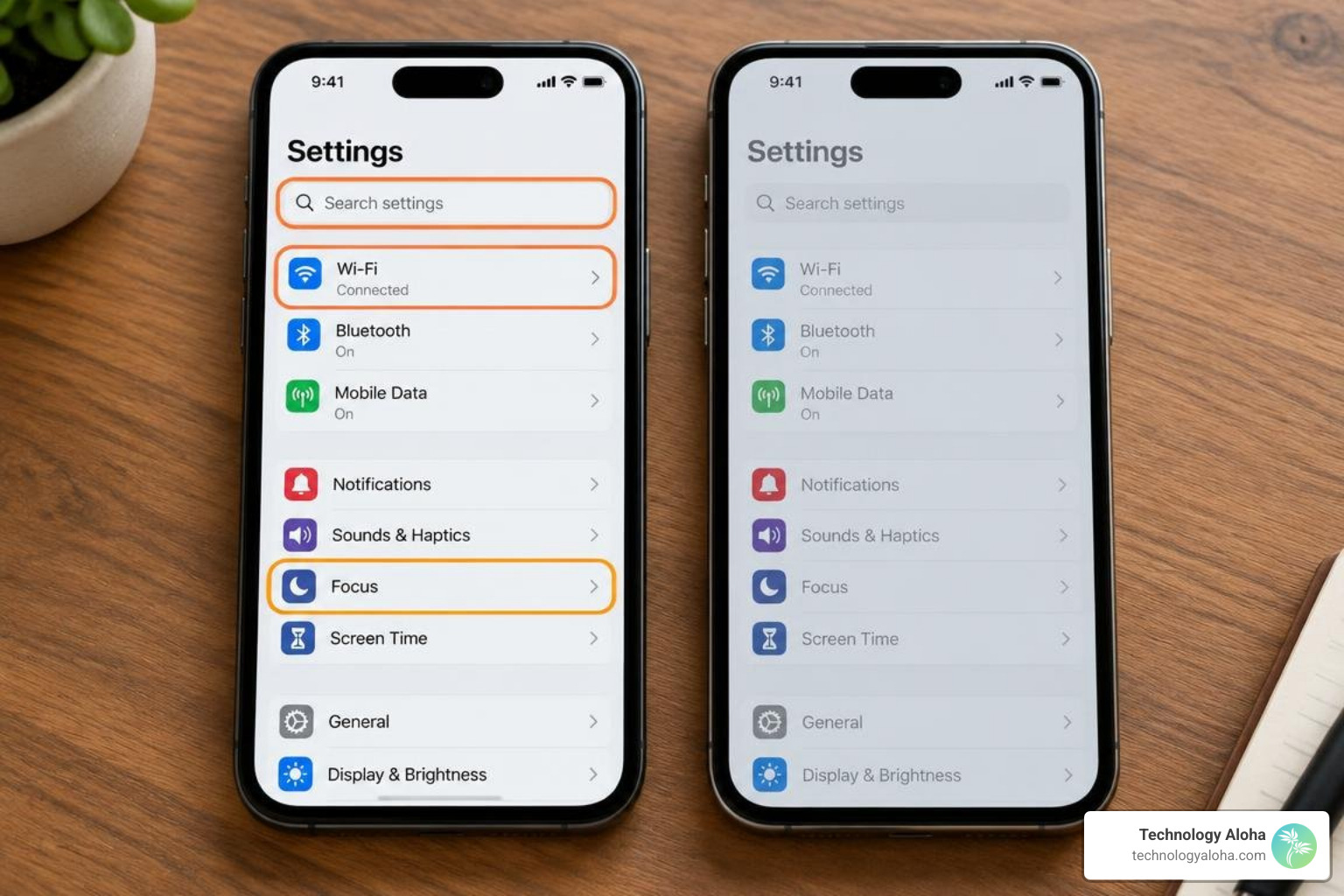
- Temporary physical limitations: A visitor with a broken wrist, a dilated eye exam, or a lost pair of reading glasses relies heavily on voice controls, high-contrast layouts, and generous touch targets.
- Situational constraints: A parent holding a toddler with one arm benefits from one-handed mobile controls. A person streaming video in a noisy terminal depends on closed captions, while someone viewing a phone on a sunny Hawaiian beach needs strong color contrast to read text clearly.
Designing for accessibility establishes a baseline of universal usability that improves the digital experience for every single visitor.
The Economic Case and AI Agent Navigation
The economic incentive for digital inclusion is immense. People with disabilities, along with their families and support networks, control an estimated $18.3 trillion in worldwide disposable income. In the United States, more than 1 in 4 adults have a disability, representing a large audience of consumers, family members, and support networks. Excluding this audience damages both revenue and community engagement.
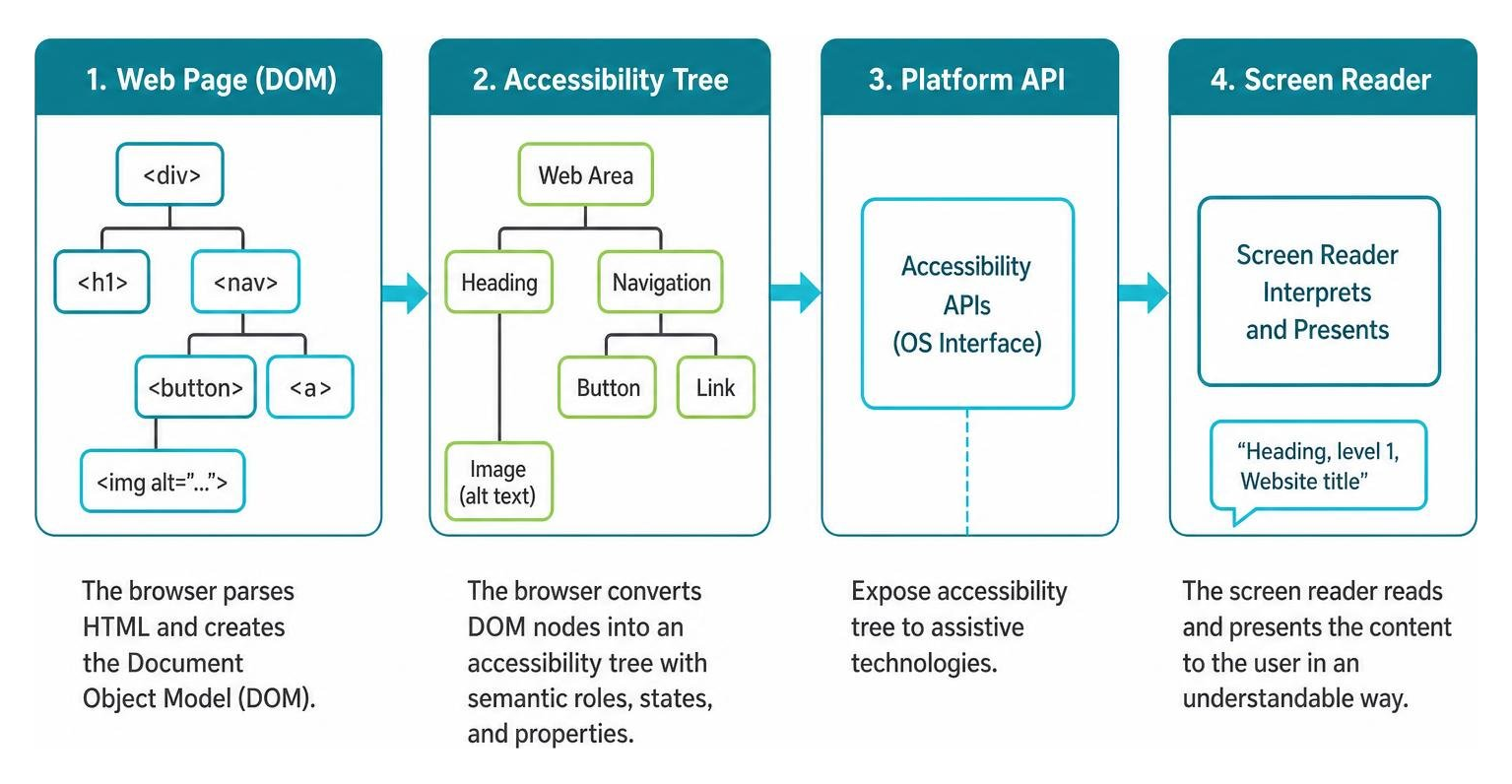
Furthermore, building an accessible foundation is essential for modern search engines and autonomous AI agents. Modern AI search agents do not interpret web pages through visual screenshots—they parse the machine-readable accessibility tree. If your buttons lack programmatic labels or your data tables omit header associations, an AI agent cannot book an appointment or complete a transaction on your site. Creating structured, semantic web layouts supports both human assistive devices and machine crawlers, as detailed in The Complete Guide to High-Conversion Websites.
Core Standards, WCAG Guidelines, and Legal Compliance Requirements
Organizations navigate a blend of technical specifications and international legal mandates to ensure equal access across the web.
| Standard / Framework | Scope & Application | Primary Requirements | Legal / Regulatory Impact |
|---|---|---|---|
| WCAG 2.2 Level A | Baseline technical criteria | Essential text alternatives, basic keyboard navigation, bypass blocks | Minimum technical floor; rarely sufficient alone for legal compliance |
| WCAG 2.2 Level AA | Global public and private sector benchmark | 4.5:1 text contrast, visible focus indicators, consistent navigation, captions | Referenced by ADA enforcement, Section 508, EAA, and state statutes |
| WCAG 2.2 Level AAA | Specialized high-accessibility environments | 7:1 text contrast, sign language interpretation, comprehensive plain language | Recommended for targeted audiences; full site-wide compliance rarely mandated |
| ADA (Titles II & III) | US state/local governments and public businesses | Nondiscrimination, effective communication across online public accommodations | Department of Justice enforcement, civil litigation risk |
| Section 508 | US federal agencies and federally funded entities | Conformance with revised federal accessibility standards | Mandatory for federal procurement, agency portals, and grant recipients |
| European Accessibility Act | Private and public organizations operating in the EU | Comprehensive digital accessibility across e-commerce, banking, and media | Enforceable across European markets with significant regulatory penalties |
To inspect individual technical rules, reference the official How to Meet WCAG (Quickref Reference) tool provided by the W3C.
The POUR Principles of WCAG 2.2
The Web Content Accessibility Guidelines center on four foundational principles, commonly known as POUR:
- Perceivable: Information and interface components must be presentable to users in ways they can perceive. Content cannot be invisible to all of a user’s senses. This requires text alternatives for non-text items, captions for audio, and distinct contrast separating foreground from background.
- Operable: Interface components and navigation must be fully operable. Users must be able to interact with all controls via keyboard alone, enjoy sufficient time to complete tasks, and navigate without encountering seizure-inducing animations.
- Understandable: Information and UI operations must be clear. Text must be readable, pages must behave predictably, and input forms must offer explicit instructions and error recovery assistance.
- Robust: Content must be robust enough to be reliably interpreted by a wide variety of user agents, including assistive technologies. This relies on clean, valid, semantic markup.
Legal Landscape: ADA, Section 508, EAA, and Global Regulations
Legal enforcement continues to intensify across the globe. In the United States, the Department of Justice applies Title II (state and local governments) and Title III (public accommodations) of the Americans with Disabilities Act directly to websites and mobile applications. Federal programs and grant-supported nonprofit platforms must also conform to Section 508 standards.
State and regional public portals set clear community baselines. For example, public services in Hawaii maintain formal commitments via an Accessibility Statement detailing their adherence to WCAG standards. In international markets, the European Accessibility Act governs commercial e-commerce platforms, while Ontario’s AODA enforces strict penalties reaching up to $100,000 per day for non-compliant corporations.
Practical Strategies to Improve Digital Design and Code
Creating an inclusive digital experience requires embedding accessibility directly into your layout systems, content workflows, and user interface architecture. Applying Best Practices for User-Centric Website Design and UX ensures your platform serves every visitor seamlessly, while following our Step-by-Step Guide to Building a Responsive Website ensures interfaces adapt across every screen size without breaking layouts.
Technical Pillars to Enhance Website Accessibility Across Forms, Media, and Code
Focus on these essential technical requirements during design and development:
- Descriptive Alt Text: Provide concise alternative text for informative imagery. If an image is purely decorative, supply an empty attribute (
alt="") so screen readers skip it without distraction. - Color Contrast: Maintain a minimum contrast ratio of 4.5:1 for standard body text and 3:1 for large headers (18pt or 14pt bold). Never convey state or instructions using color alone—pair colored alerts with icons and text labels.
- Keyboard Navigation and Focus Indicators: Ensure every link, button, menu item, and input field can be navigated using only the Tab, Enter, Space, and Arrow keys. Always preserve a prominent, high-contrast visual focus ring on active elements.
- Form Labels and Error Handling: Connect all form fields with explicit, programmatic
elements. Pair error notifications directly with inputs usingaria-describedbyso screen reader users understand how to fix mistakes. - Accessible Touch Targets: Maintain a minimum target size of 44 by 44 CSS pixels for interactive buttons and links on touch interfaces to prevent accidental activations.
- Time-Based Media Support: Supply accurate closed captions for prerecorded video, complete transcripts for audio podcasts, and clear controls to pause any background motion.
To evaluate your technical implementation against formal criteria, review WebAIM’s WCAG 2 Checklist.
Auditing, Testing Tools, and Long-Term Maintenance
Reliable accessibility requires a balance of automated testing and manual human review. While automated tools catch syntax errors quickly, roughly 60% of potential barriers require manual verification.
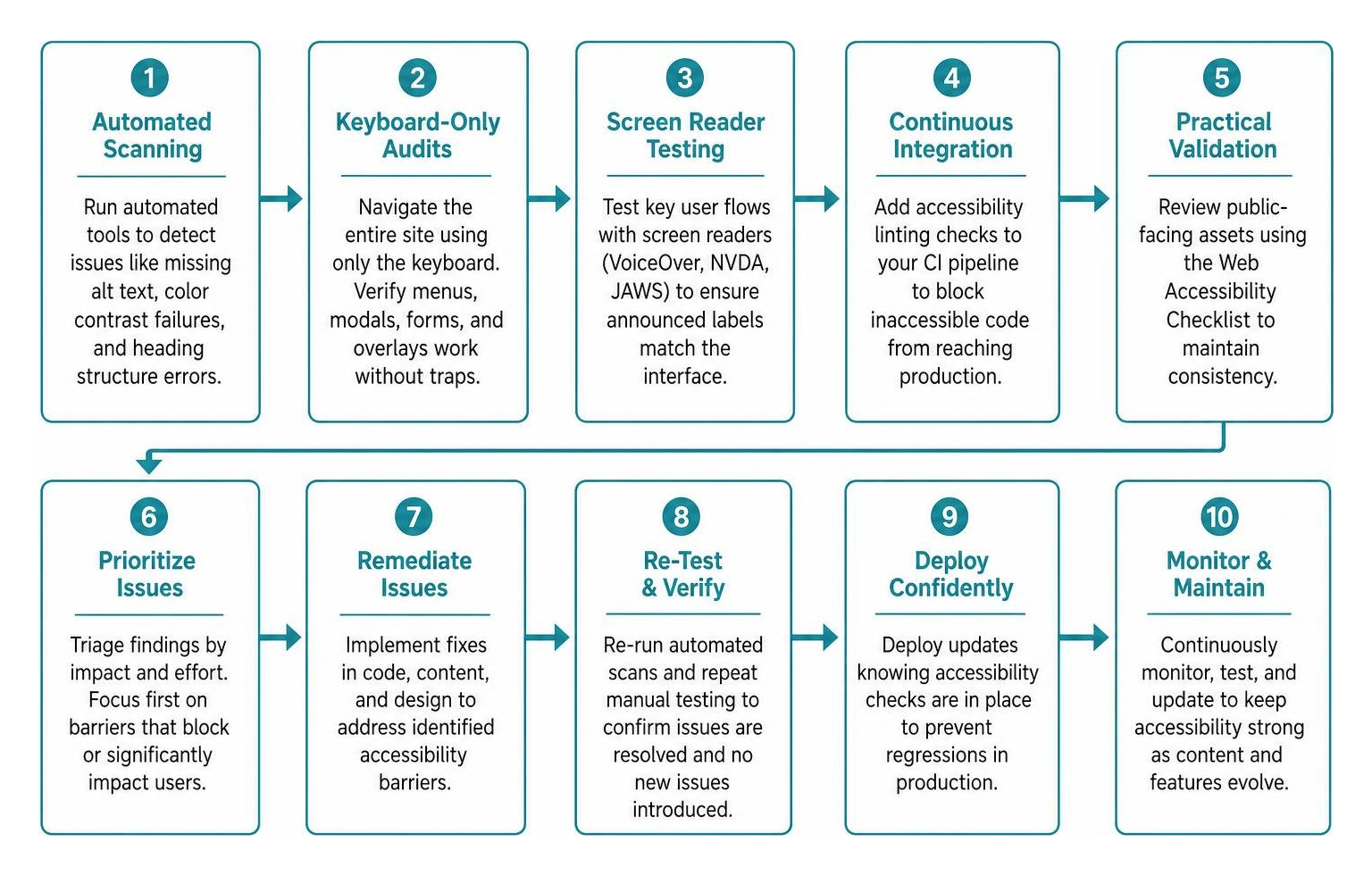
- Automated Scanning: Integrate automated linters and browser scanning extensions into your workflow to catch missing alt attributes, color contrast failures, and broken heading hierarchies.
- Keyboard-Only Audits: Disconnect your mouse and navigate your entire site using only the keyboard. Confirm you can open menus, trigger modals, fill out forms, and close overlays without getting trapped in a focus loop.
- Screen Reader Testing: Navigate your core donor, customer, or user flows using active screen readers (such as VoiceOver, NVDA, or JAWS) to verify that announced labels match visual elements accurately.
- Continuous Integration: Add accessibility linting checks into your automated deployment pipeline to block inaccessible code from reaching production.
- Practical Validation: Review your public-facing assets against the Web Accessibility Checklist to maintain structural consistency across all pages over time.
Frequently Asked Questions About Digital Accessibility
What is the difference between ADA compliance and WCAG?
The Americans with Disabilities Act (ADA) is a comprehensive United States civil rights law prohibiting discrimination against individuals with disabilities. The Web Content Accessibility Guidelines (WCAG) are technical benchmarks published by the World Wide Web Consortium (W3C). The ADA establishes the legal mandate for equal access, while WCAG 2.2 Level AA serves as the universally recognized technical standard used by courts and agencies to evaluate digital compliance.
Can automated tools catch all accessibility issues on a site?
No. Automated scanning tools catch approximately 30% to 40% of digital accessibility barriers, such as missing image attributes, low contrast ratios, or broken structural elements. However, automated checkers cannot evaluate whether alt text is meaningful, whether keyboard focus order is logical, or whether custom form validation alerts make sense to a screen reader. A comprehensive evaluation requires combining automated tools with manual keyboard navigation and assistive technology testing.
How does accessible design improve search engine optimization?
Search engine crawlers process web pages in much the same way as assistive technologies. Semantic HTML, clear heading hierarchies (H1 through H3), descriptive link anchors, structured data tables, and image alt text provide search engine algorithms with clean, easily indexed context. Furthermore, fast-loading, highly legible, accessible layouts reduce bounce rates and improve overall user engagement metrics.
Conclusion
Building an accessible digital presence is an ongoing operational commitment to inclusion, human dignity, and operational excellence. By incorporating semantic structure, robust keyboard navigation, and thoughtful visual contrast into your core digital strategy, your organization protects itself from legal liability while welcoming every community member.
At Technology Aloha, we build specialized digital infrastructure for nonprofits, food banks, and purpose-driven businesses—combining high-conversion architecture with inclusive design. Review A Practical Guide to Website Design to refine your development roadmap, or reach out to our team for Web Design services that expand your reach and support your community.