Why User-Centric Website Design Makes or Breaks Your Business Online
The best practices for user-centric website design come down to one core idea: every decision you make should serve your user, not your personal preferences
 .
.
Here is a quick snapshot of what those best practices look like in action:
| Best Practice | Why It Matters |
|---|---|
| Start with user research | Boosts usability by 85% and satisfaction by 58% |
| Design for clarity and simplicity | Reduces cognitive load and friction |
| Build mobile-first | Most users are on mobile devices |
| Follow WCAG accessibility guidelines | Reaches more users, improves SEO |
| Use consistent navigation and visual hierarchy | Builds trust and reduces bounce rates |
| Test, get feedback, and iterate | Catches problems before they cost you |
| Optimize for performance | Users are 32% more likely to leave if load time goes from 1s to 3s |
Now, here is why this matters so urgently.
Users form an opinion about your website in as little as 50 milliseconds. That is faster than a blink. If your site is confusing, slow, or hard to navigate, visitors leave — and they rarely come back.
For small businesses competing in crowded markets, a weak website is not just an aesthetic problem. It is a revenue problem.
User-centric design is not about making things pretty. It is about removing every barrier between your visitor and the action you want them to take. It is a strategic, research-driven process — and when done right, it turns your website into your best-performing salesperson.
I’m Jillyn Dillon, founder of Technology Aloha and a systems engineer turned digital strategist with over a decade of experience applying competitive intelligence and strategic frameworks to help small businesses build websites that actually convert. My approach to the best practices for user-centric website design is rooted in data, user behavior, and the same analytical rigor I developed working at one of the world’s largest aerospace firms. Let’s walk through exactly what it takes to build a site your users will love — and that your business will grow from.
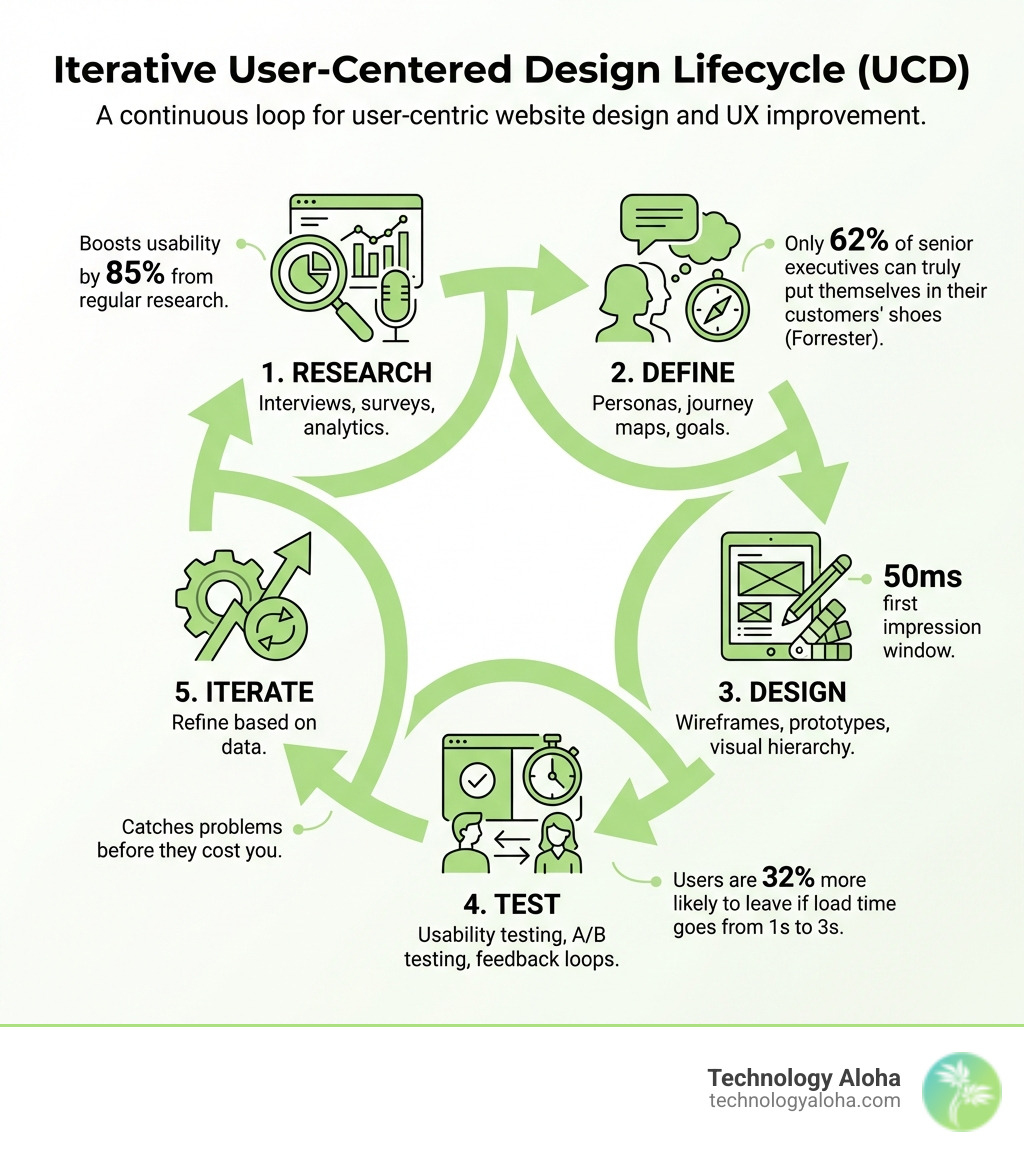
Core Principles of User-Centered Design (UCD)
At its heart, User-Centered Design (UCD) is a philosophy that prioritizes the human being on the other side of the screen. We don’t just design for “traffic”; we design for people with specific goals, frustrations, and limited time.
The most critical element of UCD is empathy. While this sounds like a “soft” skill, it has a massive impact on the bottom line. Interestingly, research from Forrester shows that only 62% of senior executives can truly put themselves in their customers’ shoes. This “empathy gap” often leads to websites that look great to the CEO but frustrate the actual customer.
To bridge this gap, we focus on several core pillars:
- Usability: Can the user do what they came to do without having to “figure it out”?
- Feedback Loops: We don’t guess what users want; we ask them. Incorporating user feedback ensures we are solving real problems, not imagined ones.
- Iterative Refinement: UCD is not a “one and done” project. It is a cycle of testing, learning, and improving.
- Collaboration: Great UX isn’t the job of a single designer. It requires developers, marketers, and stakeholders to align on the user’s needs.
By focusing on these principles, we achieve enhanced user experience (UX) for growth, which significantly reduces project risk. It is far cheaper to fix a usability issue during the design phase than it is to rebuild a site after it fails to convert visitors.
Establishing Familiarity and Consistency
One of the most powerful tools in our design shed is the human brain’s love for patterns. Users come to your site with “mental models”—pre-existing expectations of how a website should work. For example, they expect the logo to take them home and the magnifying glass to represent search.
When we lean into the psychology of web design, we reduce the cognitive effort required to use the site. Using standard UI patterns doesn’t make a site “boring”; it makes it intuitive. We also strive for external consistency, ensuring your website aligns with your holistic brand voice across all touchpoints. Understanding how psychology impacts your audience allows us to build trust through predictability. If a button behaves one way on the homepage, it should behave the exact same way on the contact page.
Clarity and Simplicity in Interaction
Simplicity is often misunderstood as “minimalism.” In UCD, simplicity actually means friction removal. We want to eliminate anything that doesn’t serve a specific purpose. This is why simple design ideas work so well; they allow the user to focus on the task at hand.
To achieve this, we follow the “one primary action per page” rule. If a user is overwhelmed by too many choices, they often choose nothing at all. This is where your website call-to-action (CTA) buttons become vital. They should be visually prominent and use clear, action-oriented language. Finally, providing immediate feedback—like a button changing color when hovered over or a “Success!” message after a form submission—reassures the user that the site is responding to them.
Best Practices for User-Centric Website Design: The Research Phase

Photo by Richard Horvath on Unsplash
Before a single pixel is placed, we must dive into the data. Research is the foundation of the best practices for user-centric website design. Without it, we are just making expensive guesses.
According to research by Maze, regularly conducting user research boosts product usability by 85%, customer satisfaction by 58%, and engagement by 44%. Research helps us:
- Challenge Assumptions: We often think we know what users want, but data frequently proves us wrong.
- Align Stakeholders: Objective data resolves internal disagreements about design direction.
- Balance Objectives: It allows us to find the sweet spot between balancing SEO and UX, ensuring the site is findable by search engines but lovable by humans.
Creating Personas for User-Centric Website Design
A “user” is too broad a concept to design for. Instead, we create user personas—archetypes that represent your target audience. A good persona isn’t just a list of demographics like age or location. It includes:
- Motivations: Why are they looking for your services?
- Pain Points: What frustrates them about your competitors?
- Behavioral Traits: Are they tech-savvy? Do they browse on their lunch break?
Understanding the psychology behind how design influences traffic helps us tailor colors, layouts, and copy to these specific personas. When a visitor feels like a website was built “just for them,” conversion rates skyrocket.
Mapping Journeys for User-Centric Website Design
Once we know who is using the site, we need to map out how they use it. We categorize these into different types of journeys:
- Critical Journeys: High-stakes paths like the checkout process or signing up for a service.
- Toothbrush Journeys: Daily or frequent tasks that need to be incredibly fast and efficient.
By storyboarding these paths, we can visualize the user’s emotional state. Are they anxious? In a hurry? This insight informs our information architecture, ensuring the most important information is always within reach. Following five key tips for your design project during this phase ensures that the final structure is logical and user-approved.
Visual Hierarchy and Layout Patterns
Visual hierarchy is the “roadmap” for the user’s eyes. By using size, color, and contrast, we tell the user what to look at first, second, and third. A clean web page layout is important because it prevents “visual noise” from distracting the user from your primary goal.
We use professional techniques like the 8-pt rhythm (spacing elements in increments of 8 pixels) and grid systems to ensure the layout feels balanced and professional. When elements are “nudged” randomly, users feel a sense of “jitter” or unreliability, even if they can’t quite name it.
Leveraging F and Z Scanning Patterns
Users rarely read web pages word-for-word; they scan them. Depending on the type of page, their eyes usually follow one of two patterns:
- The F-Pattern: Common for text-heavy pages like this Forbes article. Users scan the top, then move down the left side, looking for keywords and headings.
- The Z-Pattern: Ideal for landing pages with less text, like Zapier’s signup page. The eye moves from the top-left (logo) to the top-right (CTA), then diagonally across the center to the bottom-left, finishing at the bottom-right (final CTA).
By placing our most important focal points along these natural paths, we increase the chances of the user seeing and acting on our message.
Intuitive Navigation and Information Architecture
Navigation is the skeleton of your website. If it’s broken, the whole experience collapses. We follow the “7-item rule,” which suggests keeping primary menus to seven items or fewer to avoid overwhelming the user’s working memory.
Other navigation best practices include:
- Breadcrumbs: These act as wayfinding tools, showing users exactly where they are in the site’s hierarchy.
- Logical Grouping: Grouping similar pages together so users can find what they need intuitively.
- Search Functionality: A prominent search bar is essential for users who want to bypass menus and go straight to their goal.
Applying these 7 website psychology tips ensures that your navigation feels like a helpful guide rather than a confusing maze.
Technical Performance and Accessibility Standards
A user-centric site must be a high-performing site. No matter how beautiful the design is, users will abandon it if it’s slow. Google’s research shows that the probability of a user leaving increases by 32% as page load time goes from 1 second to 3 seconds.
We prioritize Core Web Vitals—metrics that measure loading speed, interactivity, and visual stability. To maintain this, we set “performance budgets,” limiting the size of images and third-party scripts.
Meeting WCAG Accessibility Guidelines
Accessibility is not just a “nice to have”; it is a fundamental part of the best practices for user-centric website design. We follow the WCAG 2.2 AA guidelines to ensure the site is usable for everyone, including people with visual, auditory, or motor impairments.
Key steps to make your website accessible include:
- Color Contrast: Maintaining at least a 4.5:1 ratio for standard text.
- Keyboard Operability: Ensuring all features can be used without a mouse.
- Semantic HTML: Using proper code tags so screen readers can understand the site structure.
Inclusive Design and Media Alternatives
Inclusive design goes beyond compliance; it’s about making sure every user feels welcome. This includes providing alt tags for accessibility on all images so screen reader users know what is on the page.
We also use inclusive personas that incorporate permanent, temporary, or situational disabilities. For example, a “situational disability” might be a parent trying to navigate your site while holding a crying baby. While we generally avoid disability simulators (as they can’t truly replicate the lived experience), we do use accessibility heuristics to audit our designs for common barriers early in the process.
| Feature | Mobile-First Design | Desktop-First Design |
|---|---|---|
| Primary Focus | Essential content & core tasks | Full feature set & detailed visuals |
| Navigation | Collapsed (Hamburger) menus | Expanded horizontal menus |
| Touch Targets | Large (min 44x44px) for fingers | Smaller for precise mouse clicks |
| Performance | High optimization for slower networks | Can handle larger asset loads |
| Layout | Single-column, vertical scrolling | Multi-column, complex grids |
Frequently Asked Questions about User-Centric Design
What is the difference between UI and UX?
Think of UI (User Interface) as the “look”—the buttons, colors, and fonts. UX (User Experience) is the “feel”—how easy it is to use the site and how the user feels during the process. You can have a beautiful UI that provides a terrible UX if the site is hard to navigate.
How do you measure the success of a user-centric design?
We look at both quantitative and qualitative data. This includes conversion rates, bounce rates, and “time on task” (how long it takes a user to complete a goal). We also use usability testing to see where users get stuck.
What are the most common pitfalls in user-centric design?
The biggest mistakes include designing for yourself instead of the user, skipping the research phase to save time, and ignoring mobile users. Another common pitfall is “perfectionism”—waiting to launch until everything is perfect instead of launching an MVP (Minimum Viable Product) and iterating based on real user data.
Conclusion
Implementing the best practices for user-centric website design is the single most effective way to ensure your business thrives online. By starting with empathy, grounding your decisions in data, and prioritizing accessibility and performance, you create an experience that doesn’t just attract visitors—it builds loyalty.
At Technology Aloha, we specialize in this data-driven approach. We blend strategic positioning and cohesive branding with high-conversion website design services to help small businesses in Hawaii and beyond grow.
Ready to transform your online presence into a user-centric powerhouse? Let’s build something that works for your users and your business. Contact us today to see how our data-driven insights can help you reach your goals.