Why Performance Driven Web Design Directly Impacts Your Revenue
Performance driven web design is the practice of making every design decision — layout, images, fonts, interactions — with measurable speed and business outcomes in mind, not just aesthetics.

If you want the short version:
| What It Is | Why It Matters |
|---|---|
| Design built around speed and usability | Slow sites lose customers fast |
| Every element evaluated for performance cost | 53% of mobile visitors leave after 3 seconds |
| Measurable outcomes drive design choices | 1-second improvement can lift conversions by 2% |
| Mobile-first by default | Mobile accounts for ~58% of global web usage |
| Tied to Core Web Vitals (LCP, INP, CLS) | Google uses these as ranking signals |
Here’s the uncomfortable truth most business owners don’t hear until it’s too late: your website might look great and still be costing you money.
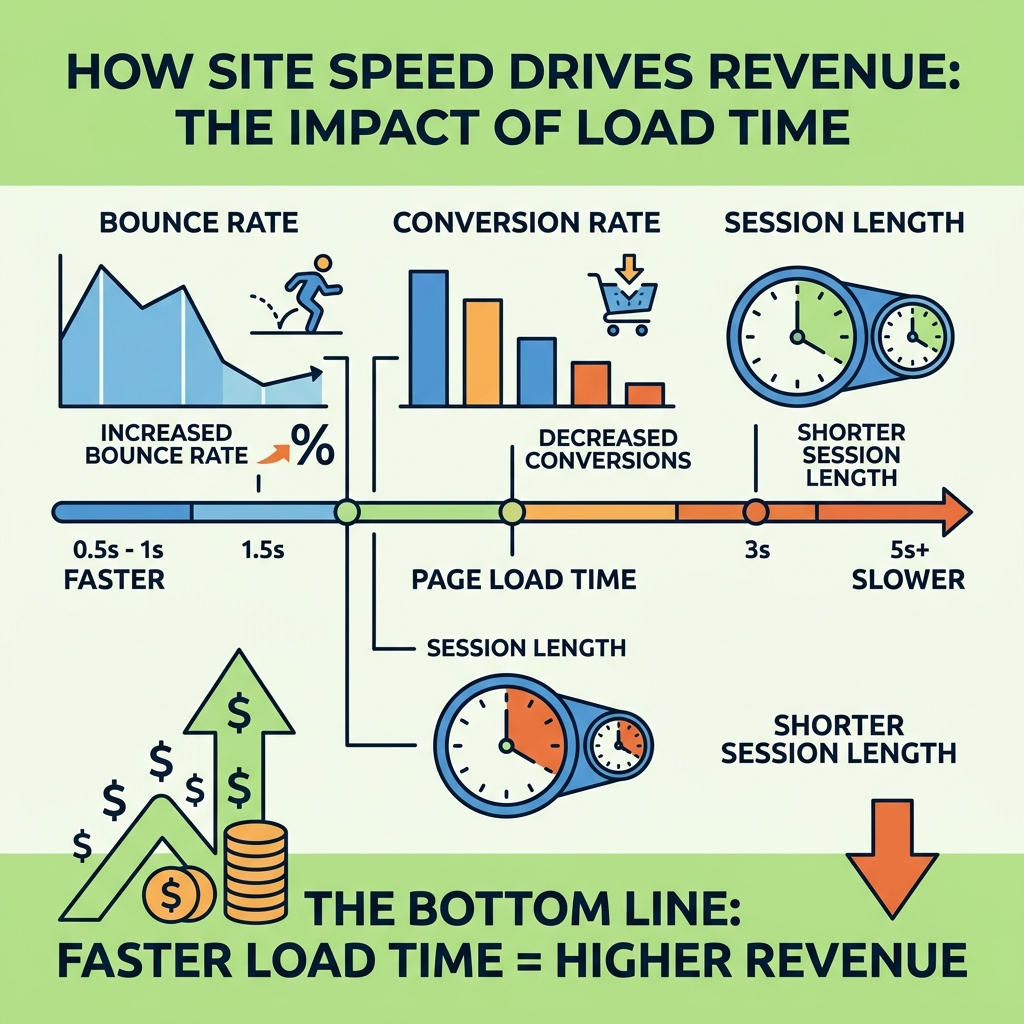
A slow site doesn’t just frustrate visitors. It actively pushes them to competitors. Amazon found that every 100ms added to load time cost them 1% in revenue. Walmart saw the reverse — every 100ms improvement drove up to 1% more revenue. These aren’t design problems. They’re business problems with design solutions.
The average web page today is 2.4MB — roughly the same size as the entire original Doom game. That’s not a coincidence. It’s the result of years of design decisions made without performance as a priority.
Performance driven web design fixes that — by building speed, usability, and conversion intent into a site from the very first wireframe.
Performance driven web design vocab to learn:
The Core Pillars of Performance Driven Web Design
To build a website that functions as a high-earning employee rather than a digital paperweight, we must look beyond the surface. In 2026, a “good” website is defined by its ability to respect a user’s time. This starts with understanding the technical benchmarks Google uses to judge your site: Core Web Vitals.
Core Web Vitals: The New Standard
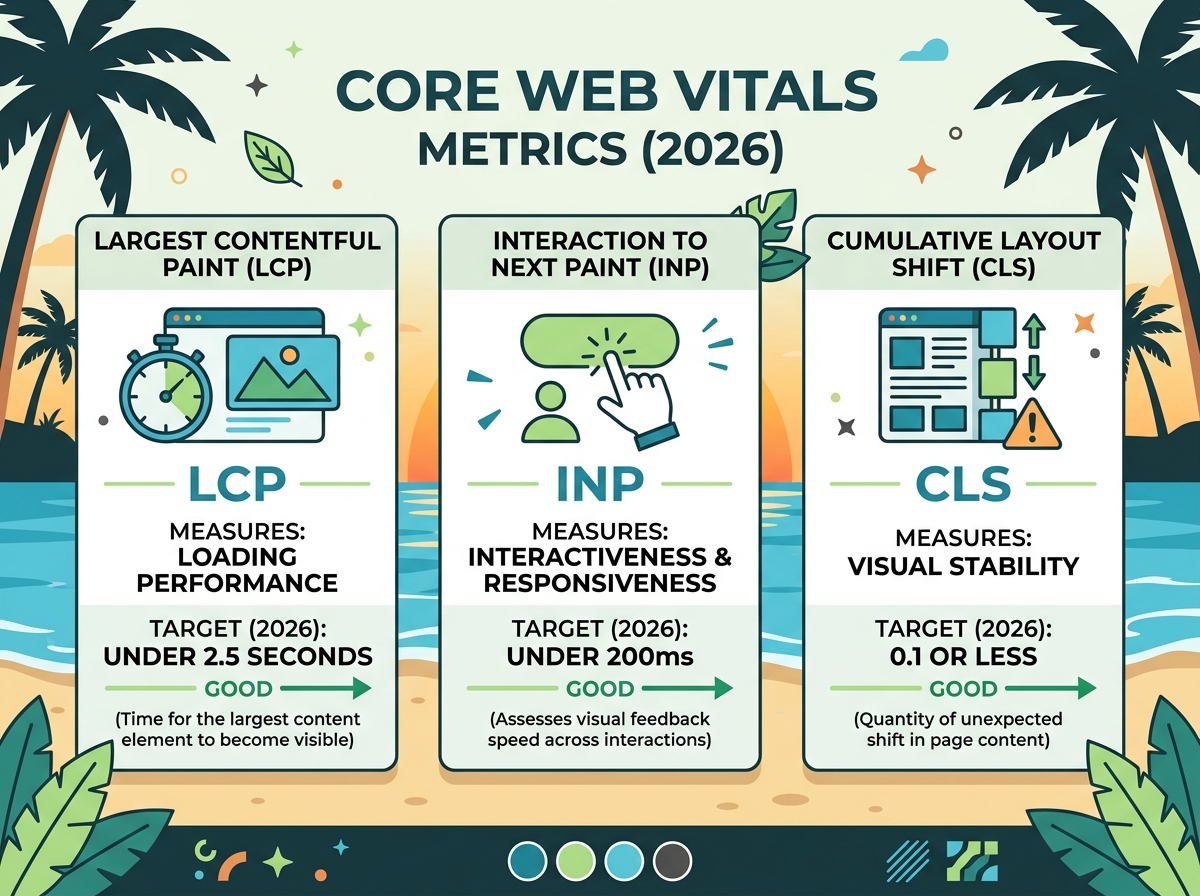
Google’s Core Web Vitals are not just “tech speak”—they are direct proxies for user frustration.
- Largest Contentful Paint (LCP): This measures loading performance. To provide a good user experience, LCP should occur within 2.5 seconds of when the page first starts loading.
- Interaction to Next Paint (INP): Replacing the older First Input Delay (FID), INP measures responsiveness. It tracks how quickly a page responds to user inputs like clicks or taps. A “good” score is under 200 milliseconds.
- Cumulative Layout Shift (CLS): This measures visual stability. Have you ever tried to click a link only for the page to jump, causing you to click an ad instead? That’s poor CLS. Your target score is 0.1 or less.
Mobile-First is Non-Negotiable
With mobile devices accounting for approximately 58% of global web usage, designing for the desktop first is a relic of the past. Performance-driven design reverses the workflow. We prioritize the smallest screens first because they operate on the tightest constraints—slower processors and variable data speeds (often around 1.6 Mbps on mobile networks).
By mastering the user-centric design process, we ensure that content is prioritized effectively. If it doesn’t serve the mobile user, it likely shouldn’t be on the desktop version either. For a deeper dive into these structural requirements, see the ultimate blueprint for high-performance website builds.
For those looking to balance beauty with these rigid standards, Lara Callender Hogan’s Designing for Performance remains the definitive text on weighing aesthetics against the end-user experience.
Why Speed is the Ultimate Business Metric
We often talk about “user experience,” but let’s talk about the bottom line. Every second of latency is a leak in your sales funnel. The data is clear: speed correlates directly with revenue.
The Cost of a Second
- Walmart: Saw a 2% increase in conversion for every 1 second of improvement in load time.
- Staples: Reduced median homepage load time by 1 second and enjoyed a 10% increase in conversion rate.
- Etsy: Saw a 12% increase in bounce rate just by adding 160kb of images to a mobile page.
When a site loads slowly, the bounce rate—the percentage of users who leave after viewing only one page—skyrockets. Sites that load in 5 seconds versus 19 seconds see 70% longer average session lengths and 35% lower bounce rates.
| Load Time (Seconds) | Impact on Conversions | Impact on Revenue |
|---|---|---|
| -1 Second | +2% Conversion Lift | Significant Growth |
| -100 Milliseconds | +1% Conversion Lift | 1% Revenue Increase |
| +100 Milliseconds | -1% Conversion Drop | 1% Revenue Loss |
A high-performance digital strategy treats speed as a feature, not a technical afterthought. If you aren’t optimizing for speed, you are effectively paying a “slowness tax” on every marketing dollar you spend. To understand the psychological side of this, read more about user experience (UX) and why it’s important for your website’s growth.
Technical Tactics for a Faster User Experience
Achieving a high-performance site requires a “death by a thousand cuts” approach to bloat. We examine every asset to ensure it earns its place on the server.
Image and Asset Optimization
Images are the single largest cause of slow websites. In 2026, standard JPEGs and PNGs are often too heavy.
- Next-Gen Formats: Use WebP (25–35% smaller than JPEG) or AVIF (up to 50% smaller).
- Responsive Images: Use
srcsetattributes so a mobile phone doesn’t download a 4000px wide image meant for a 5K monitor. - Lazy Loading: Only load images as the user scrolls down to them.
Font Subsetting and Scripts
Custom fonts are beautiful but heavy. By using font subsetting, we only load the characters actually used on the site, which can reduce font load by up to 60%. Additionally, we use font-display: swap to ensure text is visible immediately while the custom font loads in the background.
We also ruthlessly audit third-party scripts. Every tracking pixel, chat widget, and social feed adds a request to the server. If a script doesn’t contribute to the website speed optimization goals, it should be deferred or removed. For a step-by-step guide, check out the ultimate checklist to speed up page load time on WordPress.
Eliminating Elements That Harm Performance Driven Web Design
Some of the most popular design trends are the biggest performance killers.
- Carousels (Sliders): These are notorious. Only 1% of users ever click a carousel, and 90% of those clicks are on the first slide. Yet, they require massive JavaScript libraries and multiple high-res images to load.
- Auto-play Video: Unless it is highly optimized and muted, it crushes mobile performance.
- Bloated Themes: Off-the-shelf themes often include code for 50 features you’ll never use. This “code bloat” slows down every single page load.
Successful design requires a balance. You must balance SEO and user experience in your web design to ensure you aren’t sacrificing speed for a “cool” feature that no one uses. If you’re struggling with this, learn how to build a conversion-focused web design that actually works.
Building for the Future: AI-Readiness and Scalability
As we move deeper into 2026, your website isn’t just being read by humans; it’s being “read” by AI agents and Large Language Models (LLMs). Performance-driven design now includes AI-readiness.
Structured Data and Machine Readability
To ensure your business shows up in AI-generated search results, your site needs:
- Schema Markup: Using LocalBusiness and FAQPage schema helps AI understand your services, location, and hours.
- LLMs.txt: A new standard that provides clear instructions for AI crawlers on how to interpret your content.
- Semantic HTML: Using proper tags (
,,
With 96% of web pages getting zero organic traffic, these technical foundations are the only way to stay visible. Investing in the top-converting web design trends ensures your site is ready for the next shift in search.
Maintaining Speed with Performance Driven Web Design Budgets
Performance isn’t a “one and done” task; it’s a lifestyle for your website. We recommend implementing a performance budget. This is a set of limits that your team agrees not to exceed, such as:
- Total page size < 1.5MB.
- Total image weight < 1000kb.
- Maximum of 5 third-party scripts.
By using tools like Google PageSpeed Insights, you can monitor these metrics in real-time. Professional website maintenance is essential to ensure that as you add new blog posts or products, your site doesn’t slowly succumb to “feature creep.” You can also save time with these 3 tips to create a sustainable design for your website.
Frequently Asked Questions about Website Performance
How do Core Web Vitals affect my Google ranking?
Google uses these vitals as a “tie-breaker.” If two sites have equally good content, the one with better LCP, CLS, and INP scores will rank higher. Beyond ranking, they affect “user signals.” If users click your link but leave immediately because the page is slow, Google sees that “pogo-sticking” behavior and lowers your rank because your site didn’t satisfy the user’s intent.
What is the ideal load time for a mobile website in 2026?
The “3-second rule” still dominates. 53% of mobile visits are abandoned if a page takes longer than 3 seconds to load. However, for elite performance, you should aim for a “perceived” load time of under 1 second. Using techniques like skeleton screens—where a wireframe of the page shows up before the content—can make a site feel faster than it actually is.
Can I have a beautiful website that is also fast?
Absolutely. The myth that fast sites must look like 1990s Craigslist is dead. Performance-driven design is about strategic visual hierarchy. It means using CSS effects instead of heavy images, optimizing your SVG icons, and ensuring that the “above the fold” content (what you see without scrolling) loads instantly. Projects that integrate performance into the design brief from day one typically result in 20–30% faster load times without sacrificing a single ounce of style.
Conclusion
At Technology Aloha, we believe your website should be your hardest-working employee. Based in Kahului, HI, we specialize in blending high-level branding with the technical precision required for performance driven web design.
We don’t just build sites that look good on a retina display; we build sites that convert visitors into customers by respecting their time and providing a frictionless experience. Whether you are looking for strategic positioning or data-driven insights to grow your business in Hawaii and beyond, our Maui award-winning team is ready to help.
Ready to stop losing revenue to a slow website? Explore our website speed optimization services and let’s turn your site into a high-performance growth engine.