Why Your Website’s First Impression Determines Everything
User-centric website design services put real user needs, behaviors, and goals at the center of every design decision—so your site works for the people who actually visit it, not just the people who built it.
If you’re looking for the right agency, here’s what to know fast:
Top things user-centric web design agencies do:
- Research your users — interviews, surveys, analytics, and usability testing
- Map user journeys — so visitors find what they need without friction
- Design for mobile first — because most web traffic comes from smartphones
- Build for accessibility — meeting WCAG 2.1 standards so no one gets left out
- Test and iterate — wireframes, prototypes, and feedback loops before launch
- Integrate with SEO and CRO — so design drives traffic and conversions
Your website is almost always the first experience a potential customer has with your brand. Not your sales team. Not your product. Your website.
And that first impression forms fast—before anyone reads a single word of your copy.
A poorly designed site signals distrust. A confusing navigation sends people away. A slow mobile experience costs you leads you’ll never know you lost.
The numbers back this up. A mobile-first redesign for a local business led to a 40% increase in calls from the website. A checkout UX overhaul cut cart abandonment by 15%. A homepage redesign based on user research drove a 25% increase in demo requests.
These aren’t flukes. They’re what happens when design is built around people, not assumptions.
User-centric website design services close the gap between what your business offers and what your visitors actually experience. The best agencies use data, empathy, and a structured process—not gut instinct and aesthetic preferences—to build sites that perform.
This guide breaks down what those services include, how to evaluate agencies, and what a truly user-first process looks like from discovery to launch.
Defining User-Centric Website Design Services
User-centered design (UCD) is a framework where the end-user’s needs, behaviors, and limitations are given extensive attention at each stage of the design process. Unlike traditional web design, which often prioritizes the business owner’s aesthetic preferences or a designer’s “gut feeling,” user-centric website design services are rooted in empathy and scientific metrics.
Traditional approaches often treat a website as a static brochure. Modern, user-centric design treats it as a dynamic tool for problem-solving. By understanding user experience (UX) and its importance for growth, businesses can move beyond “looking good” to “working well.” This shift requires a commitment to design principles and consistency, ensuring that every interaction feels predictable and reliable.
Core Principles of User-Centric Website Design Services
To build a site that truly serves its audience, several non-negotiable pillars are followed:
- Usability: Can the user accomplish their goal quickly and without frustration?
- Accessibility: Is the site usable by everyone, including those with disabilities? Following W3C Accessibility Guidelines ensures inclusivity and expands your market reach.
- Research-Driven: Decisions are backed by data—analytics, heatmaps, and interviews—rather than assumptions.
- Information Architecture (IA): This is the structural design of shared information environments. Good IA ensures that content is organized logically so users can find what they need in three clicks or less.
- Cognitive Load: The goal is to reduce the mental effort required to use the site. Cluttered layouts and confusing jargon increase cognitive load, leading to higher bounce rates.
The Role of Psychology in Design
Effective design is applied psychology. Design principles examine how human beings perceive information and what triggers them to take action. Understanding website psychology tips allows for designing for “mental models”—the preconceived ideas users have about how a website should work.
For example, eye-tracking research shows that users typically scan pages in an F-pattern (on text-heavy pages) or a Z-pattern (on pages with visual hierarchy). By placing critical information and calls-to-action (CTAs) along these natural scanning paths, the design is aligned with innate human behavior.
The Business Case for Strategic UX
Investing in user-centric website design services isn’t just a design choice; it’s a financial one. When you remove friction from the user journey, conversion rates climb. Strategic UX builds trust, and trust builds customer loyalty.
| Feature | Traditional Design | User-Centric Design |
|---|---|---|
| Primary Goal | Visual appeal / Brand ego | Problem-solving / Conversions |
| Navigation | Creative / Unconventional | Intuitive / Standardized |
| Content | Company-focused | User-focused |
| Success Metric | “Does it look pretty?” | “Did the user complete the task?” |
| ROI | Uncertain | High (due to lower bounce/higher conversion) |
For a deeper dive into these mechanics, consult the complete guide to high-conversion websites.
Impact on SEO and Performance
Search engines like Google have evolved to reward sites that provide a superior user experience. Metrics like bounce rates and time-on-page are indirect signals of site quality. Google’s Core Web Vitals—which measure loading speed, interactivity, and visual stability—are now direct ranking factors.
Adhering to Google’s Performance Best Practices is essential. With mobile-first indexing, your mobile site is the primary version Google uses for ranking. If your mobile UX is clunky, your SEO will suffer regardless of how good your content is. Focusing on search intent ensures the design leads the user exactly where they expected to go when they clicked the search result.
Measuring Success Post-Launch
The work doesn’t end at launch. Tools like Google Analytics 4, heatmaps, and A/B testing show how real people interact with the live site. By observing how psychology impacts audience traffic, iterative improvements can be made that further boost ROI. Success is measured in meaningful engagement: lead form submissions, lower cart abandonment, and increased time spent on high-value pages.
The Step-by-Step Process of User-Centric Website Design Services
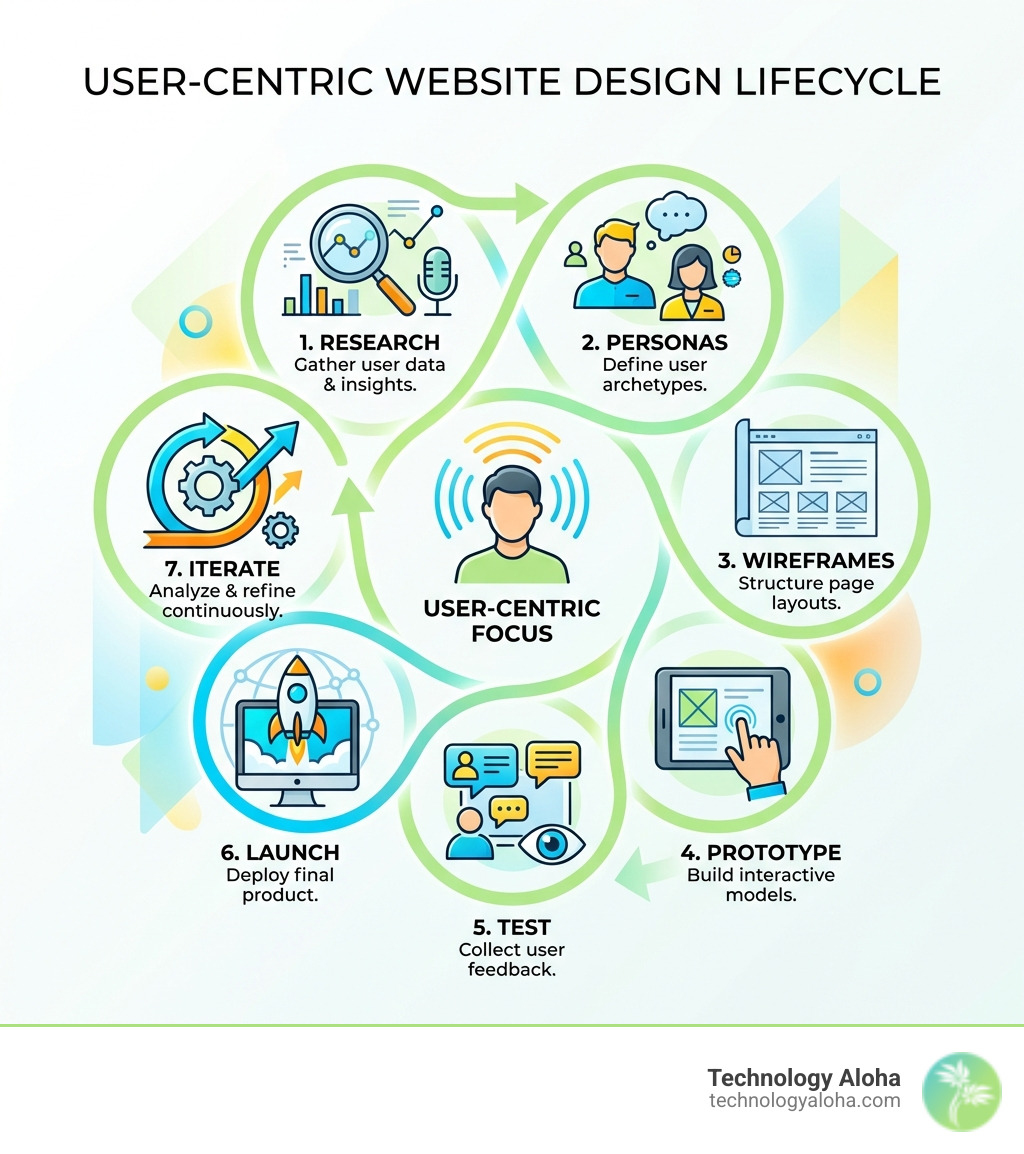
A disciplined process is what separates a professional agency from a hobbyist. It begins with a Discovery Phase. Stakeholder interviews are conducted to understand business goals, and a heuristic review of any existing site identifies obvious usability “red flags.” This is the foundation of mastering the design process.
Research and Discovery for User-Centric Website Design Services
User identification is based on research rather than assumptions. Through user interviews and surveys, qualitative data is gathered. Competitive audits also show where others in the industry are failing or succeeding. This data is distilled into User Personas—fictional characters that represent different audience segments. Industry-standard Nielsen Norman Group Research is used to validate methodologies and stay ahead of UX trends.
Wireframing, Prototyping, and Testing
Before a single pixel of “pretty” design is created, the skeleton is built.
- Wireframes: Low-fidelity blueprints that focus on layout and functionality without the distraction of colors or images.
- Prototyping: Using tools like Figma, clickable prototypes are created. This allows for testing the “flow” of the site.
- Usability Testing: Prototypes are put in front of real people. If the “Contact Us” button cannot be found in five seconds, the design is fixed. This iterative feedback loop de-risks the project, ensuring features aren’t built that nobody wants or knows how to use.
Essential Features of a Modern User-Centric Site
A modern site must be flexible. With more than half of all web traffic coming from smartphones, a mobile-first approach is mandatory. This means designing the mobile experience first to ensure the most critical information is prioritized, then scaling up for desktop.
Responsive design isn’t just about shrinking images; it’s about fluid grids and relative units. Learning responsive design basics helps businesses understand why their site must look different—but function perfectly—on every screen size.
Accessibility and Inclusive Design
Accessibility is a core component of UX, not an afterthought. Nearly 1 in 4 adults in the U.S. has some type of disability. Designing for them is both a moral imperative and a legal necessity (ADA compliance).
Key requirements include:
- Semantic HTML: Using correct tags so screen readers can interpret the page structure.
- Color Contrast: Ensuring text is readable against its background.
- Keyboard Navigation: Allowing users to navigate the site without a mouse.
- Alt Text: Providing descriptions for images.
Following the W3C Web Accessibility Initiative standards (specifically WCAG 2.1 AA) ensures your site is inclusive to all.
Performance-First Strategies
A beautiful site that takes 10 seconds to load is a failure. Performance is UX. Asset optimization (compressing images), browser caching, and minification of code are implemented to ensure lightning-fast load times. According to web.dev performance guidelines, even a one-second delay can significantly reduce user retention and conversion rates.
Frequently Asked Questions about UX Agencies
How much do professional design services cost?
The cost of user-centric website design services varies based on several factors:
- Project Complexity: A 50-page e-commerce site costs more than a 5-page service site.
- Depth of Research: Extensive user testing and field studies require more time and budget.
- Technical Integration: Custom API connections or complex back-end development increase the scope.
- Ongoing Support: Many agencies offer maintenance retainers to keep the site secure and performant post-launch.
While the upfront cost is higher than a “quick-fix” template, the long-term value—measured in increased leads and reduced need for a total redesign every two years—is significantly better.
How do I choose the right design partner?
Look for an agency that asks about your customers before they ask about your favorite colors.
- Portfolio Review: Do their past projects show a clear focus on usability, or are they just flashy?
- Strategic Alignment: Do they understand your business goals?
- Technical Stack: Do they use modern tools like Figma and frameworks like React or WordPress?
- Communication: UX design is collaborative. You need a partner who listens and explains their “why” clearly.
What is the difference between UI and UX?
These terms are often used interchangeably, but they are distinct:
- UX (User Experience): The “behind-the-scenes” work. It’s the research, the logic, the journey, and the structure. It’s about how the site works.
- UI (User Interface): The visual layer. It’s the colors, fonts, buttons, and spacing. It’s about how the site looks.
Think of it like a house: UX is the blueprint and the plumbing; UI is the paint and the furniture. You need both for a home to be livable and beautiful.
Conclusion
A website should be a company’s hardest-working employee. By blending strategic positioning and cohesive branding with user-centric website design services, businesses can achieve measurable growth. Data-driven insights ensure that a site doesn’t just attract visitors—it converts them into loyal customers.
Ready to stop guessing and start growing? Build a digital experience that puts users first.