A Practical Guide to Website Design
What Website Design Really Means for Your Business
Website design is the process of planning, structuring, and styling a website so it works for both the people visiting it and the business behind it.
Here’s what effective website design covers at a glance:
| Element | What It Means |
|---|---|
| Visual design | Layout, color, typography, imagery |
| User experience (UX) | Navigation, flow, ease of use |
| Mobile responsiveness | Works on phones, tablets, desktops |
| Performance | Fast load times, clean code |
| Conversion | Guides visitors toward action |
| Security | SSL, hosting, domain protection |
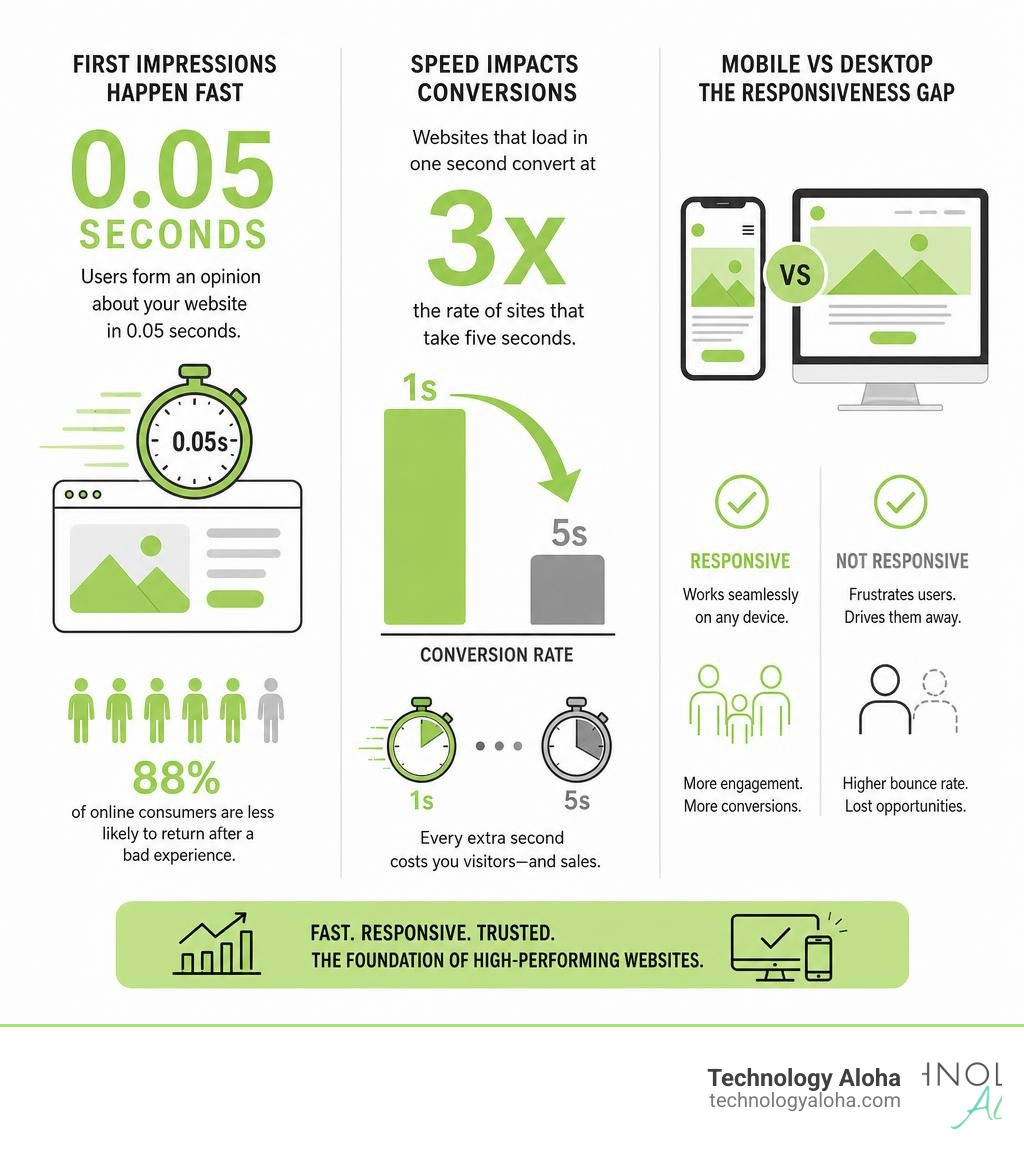
First impressions online are brutal. Research shows users form an opinion about a website within 0.05 seconds of it loading—before they’ve read a single word. That’s faster than a blink.
And the stakes are high. 88% of online consumers say they’re less likely to return after a bad experience. Lose them once, and you’ve likely lost them for good.
Speed compounds the problem. Websites that load in one second convert at 3x the rate of sites that take five seconds. Every extra second costs you visitors—and sales.
For small business owners competing in crowded markets, a weak website isn’t just an aesthetic problem. It’s a revenue problem.
The Core Pillars of Modern Website Design

Great website design is not about personal artistic expression; it is about strategic communication. When we design for businesses in Hawaii—from the bustling storefronts of Honolulu to the local services in Kahului—we balance visual beauty with functional clarity. If your website looks like an award-winning canvas but confuses your customers, it has failed its primary job.
To build an online presence that actually moves the needle, you must understand the core pillars of design:
- Layout Balance and Visual Hierarchy: Your layout dictates where the eye travels first. Western readers naturally scan pages in an F-pattern or a Z-pattern. By placing critical elements—like your primary value proposition and call to action (CTA)—along these natural scanning paths, you ensure your message is received before the user scrolls away.
- Typography with Purpose: Typography is the silent ambassador of your brand. A common mistake is using too many fonts, which creates visual noise and slows down reading comprehension. We recommend limiting your site to two primary typefaces: one for bold, commanding headers and another highly readable, web-safe font for body copy.
- Color Psychology and Brand Consistency: Colors evoke immediate emotional responses. Cool blues and teals convey trust and professionalism, while vibrant greens can signal growth, health, or a relaxed local vibe. Whichever palette you choose, it must remain consistent across every page to build consumer confidence.
- Intuitive User Experience (UX): A user should never have to think about how to navigate your site. If they have to search for your contact information or struggle to find your services page, they will leave. Clean, logical navigation menus and clear page paths are non-negotiable.
For a deeper dive into structuring your digital presence around your audience’s actual behaviors and expectations, read our comprehensive resource, The Ultimate Guide to User Centric Website Design.
Mobile Responsiveness in Modern Website Design
In 2026, designing a website for desktop first is a backward approach. Since Google completed its rollout of mobile-first indexing, the mobile version of your website is officially the primary version. If your site is clumsy on a smartphone, Google will penalize your search rankings, and your customers will abandon you.
Statistics show that mobile-responsive websites experience a 67% higher conversion rate than non-responsive sites. When a user visits your site on a phone, they are often on the go, looking for quick answers. They need touch-friendly buttons, easily readable text that does not require pinching to zoom, and fast-loading media.
True responsiveness means your site fluidly adapts to any screen size—from a massive desktop monitor to the smallest smartphone screen. To understand how this works technically and why it is the backbone of your online visibility, explore our guide on What Is Responsive Web Design.
Conversion-Focused Website Design Strategies
A beautiful website that does not convert visitors into leads or customers is just an expensive digital brochure. To make your website work as a 24/7 sales tool, every design decision must be conversion-focused.
- Clear and Direct Calls to Action (CTAs): Your CTA buttons should stand out visually. Use a contrasting accent color that draws the eye, and write action-oriented text. Instead of “Submit” or “Click Here,” use specific phrases like “Get My Free Quote” or “Book a Consultation.”
- Reducing Friction: Every extra form field or step in your checkout process is an opportunity for a user to change their mind. Keep forms short—only ask for the essential information you need to follow up.
- Social Proof and Trust Signals: People buy from businesses they trust. Incorporate client testimonials, case studies, and industry certifications prominently. For local businesses, showing that you are highly rated on platforms like Yelp for Honolulu, HI or Yelp for Maui County, HI builds instant credibility.
- Addressing Objections Upfront: Use clear headings, brief bullet points, and simple FAQs to answer common questions before they become barriers to a sale.
To learn how to structure your layout specifically to drive inquiries and sales, check out our Conversion Focused Web Design Ultimate Guide.
The Technical Foundations of High-Performance Website Design

The elements of a website that your visitors cannot see are just as important as the ones they can. High-performance website design requires a rock-solid technical foundation. If your site’s code is bloated, or if your hosting environment is sluggish, your search rankings and user experience will suffer.
To ensure your website loads instantly and remains highly secure, we focus on:
- Clean Code Architecture: Bloated themes and unnecessary plugins add weight to your pages, dragging down load speeds. Writing clean, standards-compliant HTML, CSS, and lightweight JavaScript ensures search engine crawlers can easily index your content.
- Advanced Speed Optimization: This includes implementing modern image formats (like WebP), leveraging browser caching, and setting up a Content Delivery Network (CDN) so your site loads quickly for users near and far.
- Ironclad Security: Every modern website must use HTTPS. An SSL certificate encrypts data transferred between your visitor and your server, protecting sensitive information and preventing browsers from displaying scary “Not Secure” warnings.
To see the exact technical framework required to build a fast, secure, and future-proof site, refer to The Ultimate Blueprint for High Performance Website Builds.
Streamlining Development with Modern Frameworks
Modern web development tools allow us to build highly customized, stable websites much faster than in the past. By utilizing modular CSS frameworks and clean templating engines, we can rapidly prototype layouts and ensure absolute brand consistency across dozens of unique pages.
This modern approach also simplifies ongoing maintenance. When your website is built on a clean, standardized framework, updating your content, adding new features, or adjusting your brand colors does not require rebuilding pages from scratch. It also minimizes the risk of security vulnerabilities, keeping your private business data and your users’ information safe from online threats.
Balancing Custom Web Development and Standard CMS Solutions
When planning a new website, business owners often face a crossroads: should they invest in a fully custom web development project, or use a standard Content Management System (CMS) template?
The right choice depends on your business goals, your content structure, and your plans for scaling. Let’s compare the two approaches:
| Feature | Custom Web Development | Standard CMS Templates |
|---|---|---|
| Design Flexibility | Unlimited; built from scratch to match your brand exactly. | Limited to the structure and constraints of the template. |
| Performance & Speed | Extremely fast; contains only the code your site actually needs. | Can be slow due to bloated, multipurpose code and plugins. |
| Scalability | High; easily integrates with custom APIs, databases, and tools. | Moderate; scaling often requires complex, fragile workarounds. |
| SEO Control | Complete control over site architecture, metadata, and schema. | Dependent on the theme’s built-in SEO capabilities. |
| Long-Term ROI | High; lower maintenance costs and longer lifespan. | Low-to-Moderate; templates often require frequent, breaking updates. |
For organizations with complex content structures, custom development is almost always the smarter long-term investment. It allows you to build a modular site architecture that grows with your business, rather than forcing your business processes to fit into a pre-made template’s limitations.
Executing a Safe Website Redesign
A website redesign is an exciting milestone, but it also carries significant risks. If executed incorrectly, a redesign can destroy your hard-earned search engine rankings overnight.
Many amateur agencies launch a beautiful new website but fail to map the old page URLs to the new ones. When search engines attempt to crawl your old links and find nothing but “404 Page Not Found” errors, your organic traffic will tank.
To prevent this, a professional redesign must follow a strict migration protocol:
- Perform a Comprehensive SEO Audit: Before changing anything, document your existing search rankings, organic traffic sources, and your highest-performing pages.
- Map Every Single URL: Create a spreadsheet of all current URLs. If a page URL is changing during the redesign, map it directly to its new location using a permanent 301 redirect.
- Preserve High-Value Content: Do not discard or heavily edit pages that currently drive significant search traffic without a clear strategic reason.
- Test on a Private Staging Server: Build and thoroughly test your new design, forms, and redirects in a private staging environment before making it live to the public.
- Monitor Launch Day and Beyond: Once live, monitor your site performance, search console errors, and page load speeds daily to resolve any issues immediately.
If your current website is underperforming, a visual facelift alone will not solve the underlying issues. To identify what is holding your site back and how to fix it systematically, read Why Your Website Isnt Converting and How to Fix It.
Frequently Asked Questions about Website Design
What makes a website design visually appealing and high-converting?
A visually appealing, high-converting website blends clean design with clear messaging. It uses a balanced layout, a limited and intentional color palette, and professional typography to establish trust instantly.
More importantly, it is built with the user’s goals in mind: it loads in under two seconds, features intuitive navigation, and uses prominent, action-oriented call-to-action buttons. To learn how to optimize your visual layouts to turn casual browsers into paying customers, read Make Your Website Work Harder with Conversion Focused Design.
How long does it typically take to build a professional website?
The timeline depends heavily on the complexity of the project. A simple, informational website with a handful of pages typically takes 4 to 6 weeks from kickoff to launch.
A larger, highly customized business website or an e-commerce platform with complex integrations can take 8 to 10 weeks or more. The primary factors that influence this timeline are the clarity of the initial strategy, the speed of content creation, and the complexity of custom development features.
How do I ensure my website remains secure and private?
To keep your website secure, you must use an active SSL certificate (HTTPS) to encrypt user data. Additionally, choose a high-quality, reliable hosting provider that offers automatic backups, firewalls, and active malware scanning.
If you own a custom domain, implement domain lock protections and WHOIS privacy to keep your personal contact details safe from spammers. Regular software and plugin updates are also critical to patching security vulnerabilities before hackers can exploit them.
Conclusion
Your website is the digital front door of your business. In a competitive market, relying on generic templates or slow, outdated layouts will hold your business back. To stand out and grow, you need a digital presence built on data-driven insights, cohesive branding, and high-conversion design.
At Technology Aloha, we combine strategic positioning with user-centric web design to help businesses in Kahului, Honolulu, and throughout Hawaii thrive online. We don’t just build pretty websites—we design high-performance business assets that work as hard as you do.
Ready to transform your online presence and start converting more visitors into loyal customers? Let’s build something great together. Explore our Technology Aloha Web Design Services and let’s discuss your project today.