Detailed Guide to Average Website Loading Speed Benchmarks
What Is the Average Website Loading Speed in 2026?
The average website loading speed in 2026 is 2.5 seconds on desktop and 8.6 seconds on mobile — a gap that costs businesses real money every single day.
Here are the key benchmarks at a glance:
| Device | Average Load Time | Google’s “Good” Threshold |
|---|---|---|
| Desktop | 2.5 seconds | Under 2.5s (LCP) |
| Mobile | 8.6 seconds | Under 3 seconds |
| Top 20 US sites | 1.08 seconds | — |
| Google’s first page | 1.65 seconds | — |
Those numbers tell a hard story. The average mobile site loads more than three times slower than the average desktop site — and mobile now accounts for over 60% of all web traffic.
Why does this matter beyond bragging rights?
- 53% of mobile visitors leave if a page takes more than 3 seconds to load
- Every additional second of load time cuts conversion rates by roughly 7%
- 40% of users abandon any site that hasn’t loaded within 3 seconds
The gap between what users expect and what most websites deliver is wide — and closing that gap is one of the highest-ROI moves a website owner can make.
For nonprofit leaders especially, a slow website isn’t just a technical problem. It’s a donor walking away before they ever hit the donate button.
What is the difference in average website loading speed between desktop and mobile?
The average website loading speed shows a significant disparity: the median load time for top 1,000 websites is 2.1 seconds on desktop but 3.8 seconds on mobile. For all websites, this stretches to 3.21 seconds on desktop and a painful 8.6 seconds on mobile. This gap, often over 5 seconds for the broader web, is a direct drain on user engagement, primarily due to the physical constraints of mobile hardware and cellular networks. Mobile devices must parse complex code on fluctuating cell signals and less powerful CPUs, leading to webpages taking on average 70.9% longer to load than their desktop counterparts. This directly impacts Google’s mobile-first indexing, as a slow mobile site will suffer in search visibility. The issue is compounded by bloated page design, with average mobile page weight climbing to 2.24 MB in 2026, nearly 90% of desktop weight, leading to high bounce rates.
This 1.7-second gap for top-tier sites—and over 5-second gap for the broader web—represents more than just a minor technical delay; it is a direct drain on user engagement. The root cause of this performance divide lies in the physical constraints of mobile hardware and cellular networks. Desktop computers benefit from hardwired fiber connections or robust Wi-Fi networks coupled with high-performance multi-core processors. Mobile devices, by contrast, must parse complex code while navigating fluctuating cell signals, thermal throttling, and less powerful CPUs.
As detailed in the HTTP Archive: Loading Speed, webpages on mobile devices take on average 70.9% longer to load than their desktop counterparts. This reality directly clashes with Google’s mobile-first indexing policy. Google ranks the mobile version of your content, not the desktop version. If your mobile site takes nearly nine seconds to load, your search visibility will suffer, regardless of how fast your desktop experience feels in your office.
The issue is compounded by bloated page design. In 2026, the average desktop page weight is approximately 2.45 MB, while the average mobile page weight has climbed to 2.24 MB. Serving a page that is nearly 90% of the desktop weight to a mobile user on a cellular network is a recipe for high bounce rates. It shows a fundamental disregard for mobile connection constraints.
How Connection Types Affect Average Website Loading Speed
A website tested on a high-speed corporate network in downtown Kahului will always appear fast. But that is not how your real-world users experience your site. Real performance is dictated by connection types, latency, and physical distance from the hosting server.
Data from the Chrome UX Report reveals that connection speeds vary wildly across demographics. While 5G networks offer near-instantaneous data transfer, 3G connections still represent roughly 16% of global web traffic. When a user in a rural area or an underserved community attempts to access a food bank directory or a disaster relief portal, they are often operating on constrained connections.
For organizations based in geographically isolated locations like Hawaii, physical distance introduces unavoidable network latency. A data packet traveling from a server on the US Mainland to a mobile device in Kahului must traverse thousands of miles of undersea fiber-optic cables. This physical distance adds a baseline delay to the Time to First Byte (TTFB). If your website requires dozens of separate round-trips to pull unoptimized images, custom fonts, and third-party tracking scripts, that baseline latency multiplies. Under these conditions, a page that loads in 2 seconds in California can easily take 6 to 10 seconds to render on a smartphone in Maui.
What is the business cost of sluggish website performance?
Every millisecond of delay acts as a barrier between your visitor and the action you want them to take. Whether you are running an e-commerce platform or managing a critical virtual donation platform for a food bank, speed directly dictates your bottom line.
How do bounce rates and user abandonment relate to website loading speed?
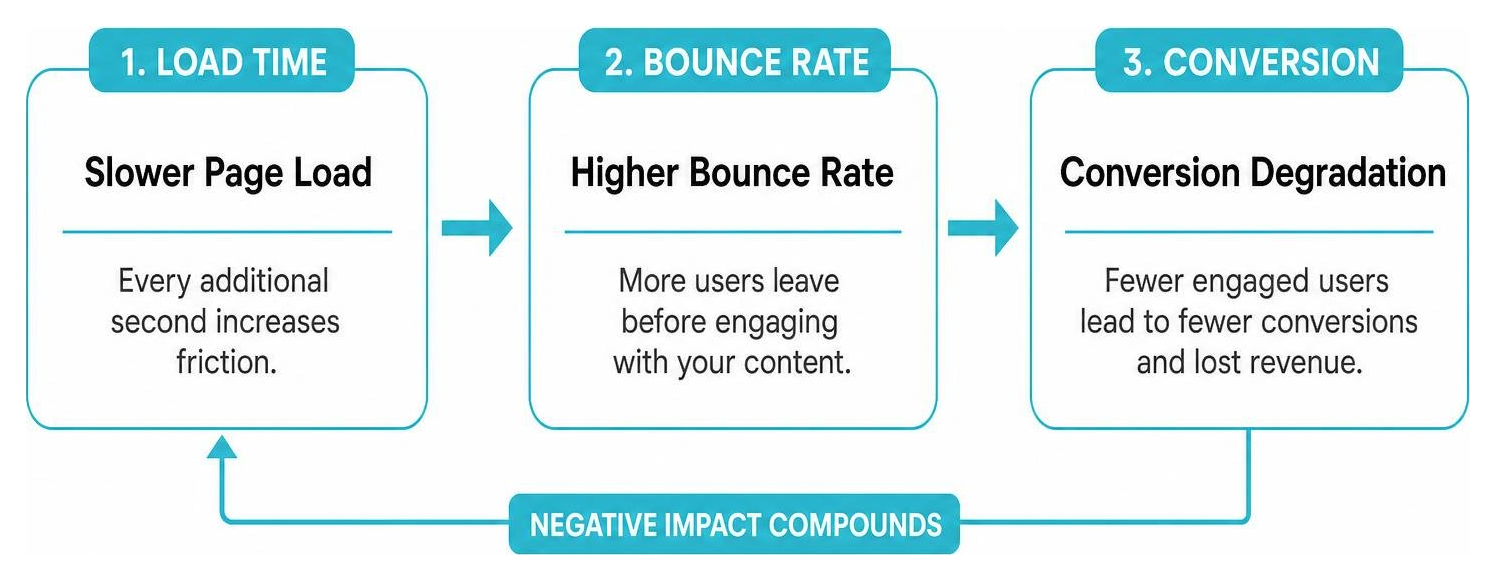
Bounce rates and user abandonment are directly and brutally related to website loading speed: when your website speed slows down, your bounce rate climbs significantly. For example, a 1 to 3-second load time increases bounce probability by 32%, spiking to 90% for 1 to 5 seconds, and 123% for 1 to 10 seconds. Mobile users are particularly impatient, with over 53% abandoning a page if it takes longer than three seconds to load. For nonprofits, this means losing potential supporters before they engage. This abandonment also negatively impacts SEO rankings, as Google interprets 'pogo-sticking' behavior as an unsatisfactory user experience, dragging down organic rankings over time.
- 1 to 3 seconds: The probability of a user bouncing increases by 32%.
- 1 to 5 seconds: The probability of a bounce spikes by 90%.
- 1 to 10 seconds: The probability of abandonment increases by 123%.
For mobile users, the threshold of patience is incredibly low. Over 53% of mobile site visitors will abandon a page entirely if it takes longer than three seconds to load. If you are running a nonprofit, this means more than half of your potential supporters, volunteers, and clients leave before they even see your mission statement.
This abandonment pattern directly impacts your search engine optimization. When users click on your link in search results and immediately click “back” because the page is slow to load, Google notices. This behavior, known as pogo-sticking, signals to search algorithms that your page did not provide a satisfactory experience, dragging down your organic rankings over time.
To understand why your speed scores might not match what your users are actually experiencing, read our guide on Why Your Google Pagespeed Insights Score Is Lying To You.
How does website loading speed affect conversion rates?
Website loading speed significantly degrades conversion rates: if a visitor stays on your site despite slow load times, their likelihood of completing a transaction drops with each passing second. Specifically, conversion rates drop by 4.42% with each additional second of load time between zero and five seconds. This impact is stark: B2B sites loading in 1 second achieve 3-5 times higher conversion rates than slower sites, and mobile delays can slash conversion rates by up to 20% per second. Nearly 70% of consumers confirm page speed impacts their willingness to purchase. For nonprofits, slow donation pages create friction, causing donors to abandon their impulse to give due to stalls, redirects, or freezing, highlighting the critical need for Website Speed Optimization to build trust and support.
The contrast between optimized and unoptimized sites is stark:
- B2B Performance: B2B sites that load in 1 second achieve conversion rates 3 times higher than sites that take 5 seconds, and 5 times higher than those taking 10 seconds.
- Mobile Impact: On mobile devices, every single second of delay can slash conversion rates by up to 20%.
- Consumer Sentiment: Nearly 70% of consumers openly admit that page speed directly impacts their willingness to purchase from an online retailer.
For food banks and nonprofits, this conversion friction is a critical vulnerability. When a donor decides to give, they are acting on an emotional impulse to help. If your donation page stalls, requires multiple redirects, or freezes while loading a heavy credit card processing script, that impulse fades. The donor gets distracted, grows skeptical of your platform’s security, or simply runs out of time.
By prioritizing Website Speed Optimization, you directly reduce this donation friction. A fast, clean, and responsive donation portal respects the donor’s time and builds immediate trust, turning casual visitors into active supporters.
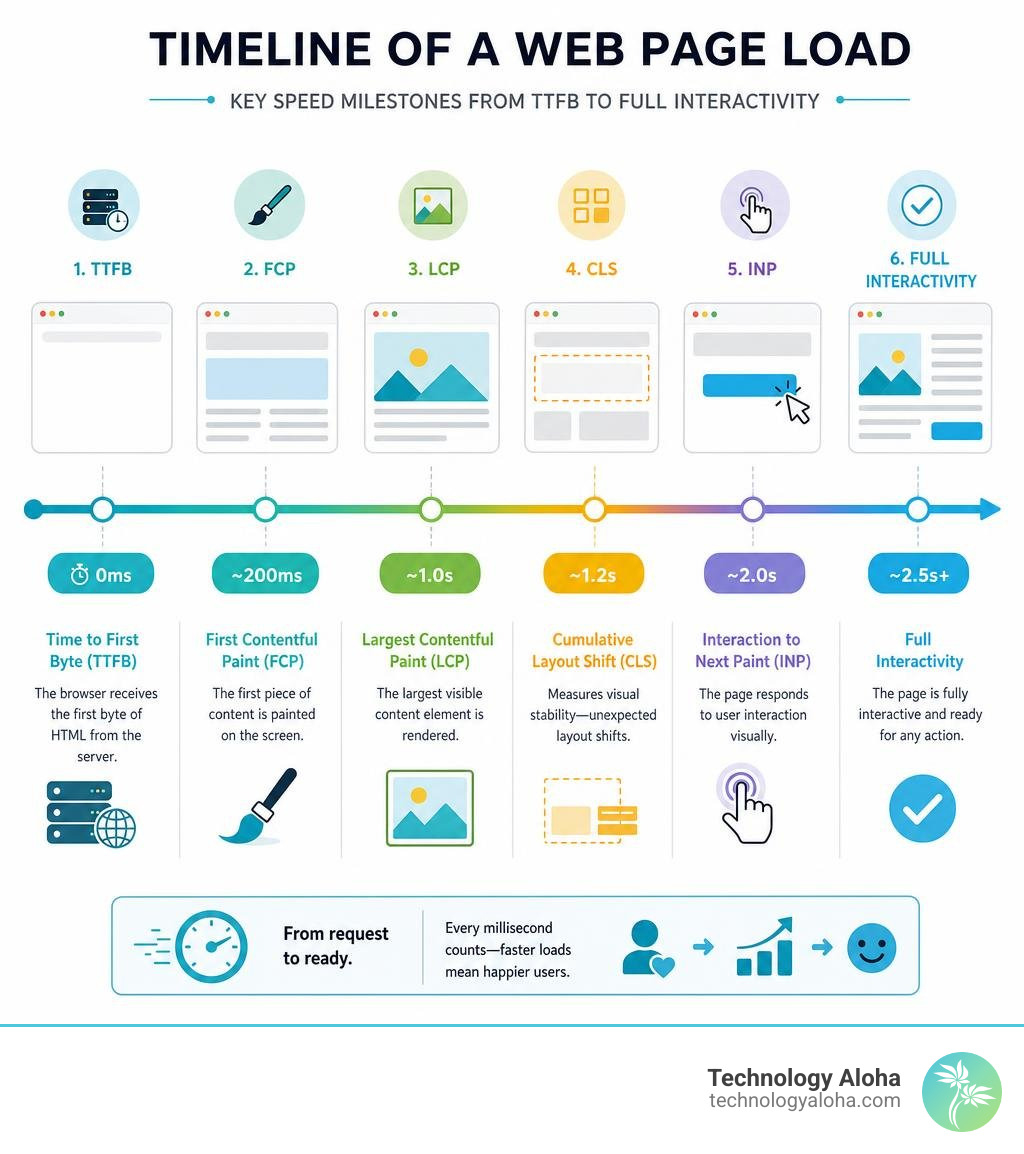
What are Core Web Vitals and how do they relate to speed optimization strategies?
Core Web Vitals are a set of specific, real-world metrics established by Google to measure and improve user experience by tracking loading speed, interactivity, and visual stability. These metrics are direct measurements of user frustration, not arbitrary technical milestones. Currently, the web is largely unoptimized, with only 34% of top 100 websites passing Core Web Vitals on desktop and 32.3% on mobile, and only about 51% of all websites passing across the broader web. To protect your rankings and improve user experience, understanding and optimizing for these three core pillars is crucial, as they directly inform speed optimization strategies.
Currently, the state of the web is highly unoptimized. Only 34% of the top 100 websites pass their Core Web Vitals on desktop, and that number drops to 32.3% on mobile. Across the broader web, only about 51% of all websites successfully pass all three benchmarks, as reported in recent industry performance statistics.
To protect your rankings and improve user experience, you must understand and optimize for each of these three core pillars. For an in-depth strategy, see our article on The Most Effective Ways To Improve Core Web Vitals.
What is Largest Contentful Paint (LCP)?
Largest Contentful Paint (LCP) measures perceived loading speed, marking the point in the page load timeline when the main content (like a hero image or prominent text) has likely loaded. A 'Good' LCP is under 2.5 seconds, 'Needs Improvement' is 2.5 to 4.0 seconds, and 'Poor' is over 4.0 seconds. Poor LCP scores are primarily caused by slow server response times, render-blocking JavaScript and CSS, and unoptimized image assets. Elite sites achieve rapid LCP by prioritizing loading sequences, loading critical text first, using lightweight image formats, and deferring non-essential scripts until after primary visual elements are rendered.
- Good: Under 2.5 seconds.
- Needs Improvement: 2.5 to 4.0 seconds.
- Poor: Over 4.0 seconds.
The primary culprits behind a poor LCP score are slow server response times, render-blocking JavaScript and CSS, and unoptimized image assets. When a browser requests a page, it must download and parse all render-blocking files before it can display the main content. If your homepage features a massive, uncompressed high-resolution photo of your latest community event, the browser will struggle to render it quickly.
According to data from the HTTP Archive: Top 1,000: Loading Speed, elite sites achieve rapid LCP scores by prioritizing the loading sequence. They load critical text first, use modern, lightweight image formats, and defer non-essential scripts until after the primary visual elements are fully rendered.
What is Interaction to Next Paint (INP)?
Interaction to Next Paint (INP) is a Core Web Vital that assesses a page’s overall responsiveness throughout a user’s entire visit by tracking the latency of all tap, click, and keyboard inputs, having replaced First Input Delay (FID) in March 2024. A 'Good' INP is under 200 milliseconds, 'Needs Improvement' is 200 to 500 milliseconds, and 'Poor' is over 500 milliseconds. Users expect immediate visual feedback when interacting with a page; if the browser’s main thread is busy with heavy JavaScript, the page appears frozen. To ensure crisp interactions, minimize JavaScript execution time, break up long tasks, and remove unused tracking codes.
- Good: Under 200 milliseconds.
- Needs Improvement: 200 to 500 milliseconds.
- Poor: Over 500 milliseconds.
When a user clicks a “Donate Now” button or attempts to expand an FAQ accordion, they expect immediate visual feedback. If the browser’s main thread is busy executing heavy, unoptimized JavaScript files, the page will appear frozen or unresponsive.
To keep your site’s interactions crisp, you must minimize JavaScript execution time, break up long tasks into smaller chunks (under 50ms), and remove unused tracking codes. For a comprehensive list of techniques to free up your browser’s main thread, read our guide on 23 Techniques For Website Performance Optimization.
What is Cumulative Layout Shift (CLS)?
Cumulative Layout Shift (CLS) measures how often users experience unexpected layout shifts on a page, quantifying the frustrating experience when a page shifts at the last microsecond, causing misclicks. A 'Good' CLS is under 0.1, 'Needs Improvement' is 0.1 to 0.25, and 'Poor' is over 0.25. These shifts typically occur because image and video elements lack specified width and height dimensions in HTML, preventing the browser from reserving space. Other causes include dynamic content insertions and unoptimized custom web fonts, which can lead to Flash of Invisible Text (FOIT) or Flash of Unstyled Text (FOUT). Using the CSS font-display: swap property helps ensure text remains visible and stable.
- Good: Under 0.1.
- Needs Improvement: 0.1 to 0.25.
- Poor: Over 0.25.
Layout shifts typically occur because image and video elements do not have specified width and height dimensions in the HTML code. Without these dimensions, the browser cannot reserve the correct amount of space on the screen while the asset downloads, forcing elements to jump around once the file finally loads.
Other common causes include dynamic content insertions (like newsletter sign-up bars popping up at the top of the page) and unoptimized custom web fonts. When a custom font loads slowly, the browser may initially display a default system font and then abruptly swap it out once the custom file arrives—a phenomenon known as Flash of Invisible Text (FOIT) or Flash of Unstyled Text (FOUT). Utilizing the CSS font-display: swap property, as highlighted in the HTTP Archive: State of the Web, ensures your text remains visible and stable during the loading process.
What are practical steps to speed up page load time?
To speed up page load time, practical steps include compressing and converting images to modern formats like WebP or AVIF, leveraging browser and server caching for static assets, implementing a Content Delivery Network (CDN) to serve content from closer servers, eliminating plugin bloat by auditing and disabling non-essential plugins, and minifying and deferring code by removing unnecessary characters and loading non-critical scripts asynchronously. These high-impact technical adjustments can dramatically lower your average website loading speed without requiring a complete rebuild.
- Compress and Convert Images: Images account for roughly 48% of the average webpage’s total weight. Convert traditional PNG and JPEG files into modern formats like WebP or AVIF, which offer superior compression without sacrificing visual quality. Additionally, ensure your images are properly resized; do not upload a 4000-pixel-wide photo if it will only display in a 400-pixel container.
- Leverage Browser and Server Caching: Caching stores static assets (like logos, CSS files, and JS scripts) directly on the visitor’s device or server. When they return to your site or navigate to a new page, their browser loads these files locally instead of downloading them again from scratch, slashing repeat load times.
- Implement a Content Delivery Network (CDN): A CDN is a globally distributed network of servers that cache your site’s content. When a user in Kahului accesses your website, the CDN serves the files from the closest regional edge server rather than routing the request all the way to a mainland data center, shaving hundreds of milliseconds off your TTFB.
- Eliminate Plugin Bloat: Every plugin you add to your CMS introduces extra code, database queries, and script requests. Conduct a thorough audit of your active plugins, disable any that are non-essential, and replace bloated tools with clean, lightweight alternatives.
- Minify and Defer Code: Clean up your source code by removing unnecessary spaces, comments, and formatting characters from your HTML, CSS, and JavaScript files. Set non-critical scripts to load asynchronously or defer them entirely so they do not block the initial page rendering.
If you are running a WordPress site, you can implement these steps systematically by following The Ultimate Checklist to Speed Up Page Load Time on WordPress.
Frequently Asked Questions about Website Speed
What is a good page load time?
An ideal page load time is under 2 seconds. Google recommends keeping load times below this threshold to ensure a positive user experience. If your site loads in under 1.65 seconds, you are performing on par with the average website ranking on the first page of Google search results. For highly competitive industries, aiming for a load time under 1 second will give you a significant competitive advantage.
How does page speed affect SEO rankings?
Page speed is a direct, official ranking signal for both desktop and mobile search results. Google prioritizes fast-loading websites because they provide a better user experience. Additionally, slow websites consume more of Google’s “crawl budget”—the limited number of pages a search engine bot will crawl on your site during a single session. If your site is sluggish, search engines will index your content less frequently, hurting your visibility for new search queries.
Why is my website loading so slowly?
The most common causes of slow website speeds include:
- Unoptimized Media: Large, uncompressed images and self-hosted video files.
- Excessive Plugins: Too many active plugins or third-party tracking scripts running in the background.
- Substandard Hosting: Cheap, shared hosting environments that struggle to handle traffic spikes or deliver fast server response times.
- Render-Blocking Resources: CSS and JavaScript files that prevent the page from displaying content until they are fully loaded.
What are the key takeaways about website loading speed and its impact?
The key takeaway is that in 2026, a slow website is a significant barrier to organizational growth, directly impacting search rankings, bounce rates, and conversion rates. For nonprofits and food banks, this translates to fewer donations, reduced community support, and limited impact. Technology Aloha addresses this by building scalable, highly optimized digital infrastructure specifically for food banks and nonprofits, focusing on clean code, optimized asset delivery, and reduced donation friction to ensure fast, responsive platforms that convert visitor engagement into real-world support. We help optimize your digital presence to make your website faster and more effective.
At Technology Aloha, we build scalable, highly optimized digital infrastructure designed specifically for food banks and nonprofits. By focusing on clean code, optimized asset delivery, and reduced donation friction, we ensure your platform is fast, responsive, and ready to turn visitor engagement into real-world support.
Ready to make your website faster and more effective? Let us help you optimize your digital presence. Explore our specialized services in Website Speed Optimization and let’s build an online home that truly serves your community.