Your WordPress Site Is Slow — Here’s What to Do About It
If you want to speed up page load time WordPress, here are the highest-impact steps, in order:
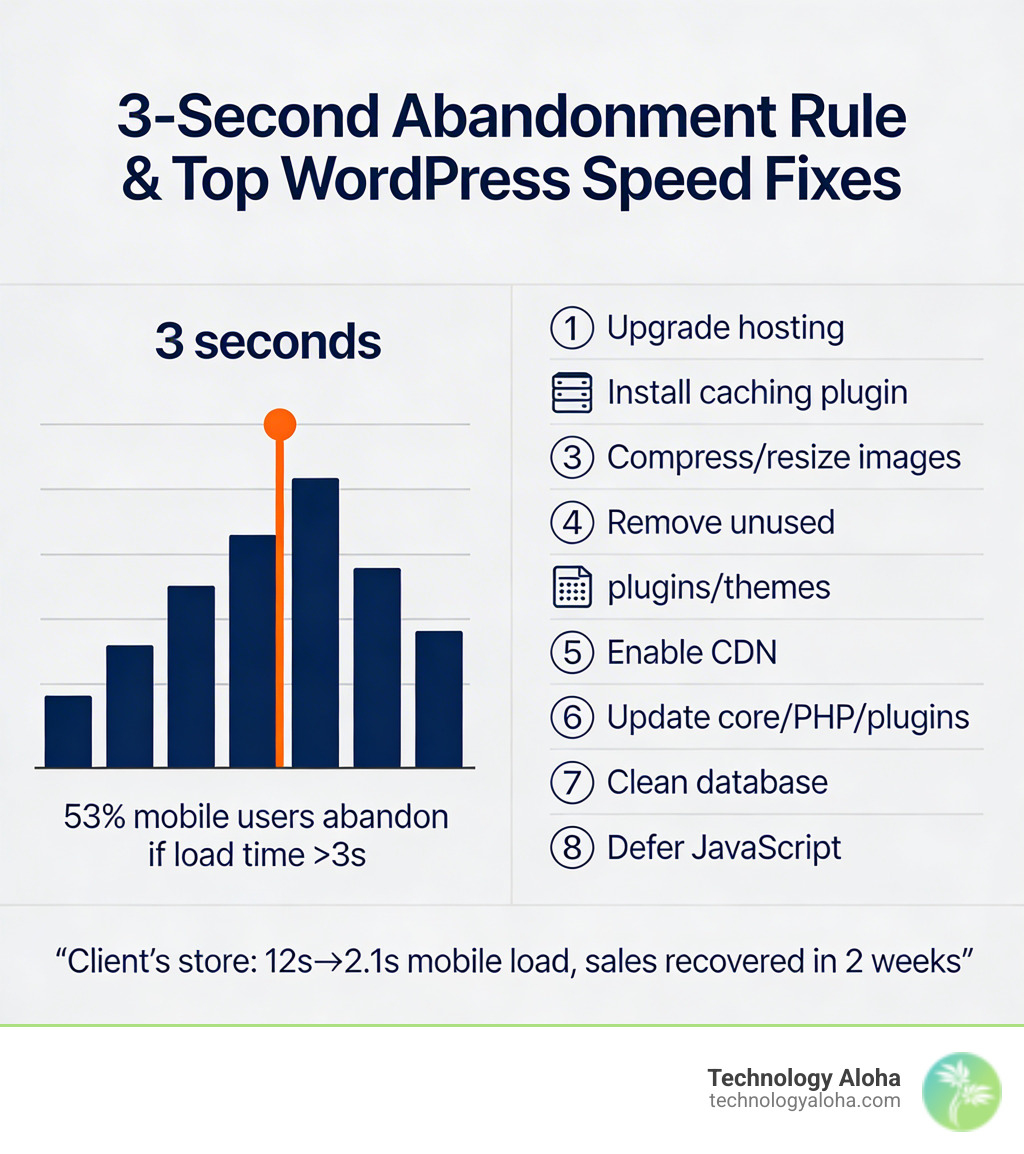
- Upgrade your hosting — shared hosting is the most common culprit
- Install a caching plugin — WP Rocket, WP Super Cache, or W3 Total Cache
- Compress and resize images — convert to WebP format
- Remove unused plugins and themes — audit ruthlessly
- Enable a CDN — Cloudflare is free and effective
- Update WordPress core, PHP, themes, and plugins — outdated PHP alone can cost you 20% in processing speed
- Clean your database — remove revisions, spam, and orphaned data
- Defer render-blocking JavaScript — use async or defer attributes
A client’s online store was loading in 12 seconds on mobile. Abandoned carts were piling up. Two hours of focused optimization brought it to 2.1 seconds. Sales recovered within two weeks.
That’s not a miracle — that’s what happens when you fix the right things in the right order.
The stakes are real. A one-second delay in page load time can reduce conversions by 7%, cut page views by 11%, and drop customer satisfaction by 16%. Over half of mobile users will leave a site that takes more than three seconds to load. And Google has used site speed as a ranking signal since 2010.
For small business owners, a slow WordPress site isn’t just a technical annoyance — it’s a revenue problem disguised as a web problem.
The good news: most WordPress slowness comes from a short list of fixable issues. Bad hosting. Unoptimized images. Too many plugins. No caching. Outdated software. You don’t need to be a developer to fix most of them.
This checklist walks you through every optimization that actually moves the needle — from quick wins you can do in minutes to advanced techniques that compound over time.
Why Speed is Critical for SEO and UX
In the digital world, patience is a relic of the past. Modern users expect instant gratification. If your site drags its feet, visitors won’t wait; they will bounce. Studies show that over half of mobile users abandon sites that take longer than three seconds to load. This isn’t just about impatience; it’s about the bottom line. Research indicates that a site that loads in 1 second has a conversion rate 5x higher than a site that takes 10 seconds to load.
Speed is also a fundamental ranking signal. Google’s mission is to provide the best possible user experience, and a slow-loading page is a poor experience. Consequently, slow sites are pushed down in search results, reducing your visibility and organic traffic. At Technology Aloha, we emphasize website speed optimization because we know that a fast site is the foundation of any successful digital marketing strategy.
Why You Must Speed Up Page Load Time WordPress for SEO
Google has refined its speed metrics into what are known as Core Web Vitals. These are the specific factors Google considers important in a webpage’s overall user experience. To speed up page load time WordPress effectively for SEO, you must master three specific metrics:
- Largest Contentful Paint (LCP): This measures how long it takes for the main content of a page to load. You should aim for an LCP to occur within the first 2.5 seconds.
- Interaction to Next Paint (INP): This tracks responsiveness. It measures the time it takes for a page to respond to a user interaction, like clicking a button. A good INP of less than 200 milliseconds is the goal.
- Cumulative Layout Shift (CLS): This measures visual stability. Have you ever tried to click a link, only for the page to jump and cause you to click an ad instead? That’s a high CLS. Aim for a CLS score of less than 0.1.
Diagnosing Performance Bottlenecks
Before you can fix the problem, you have to find it. Many DIY site owners fall into the downside of diy web design by guessing what’s wrong instead of using data. Testing your site from your own office in Hawaii isn’t enough; you need to know how it performs for a user in New York or London.
Several free tools provide deep insights into your site’s performance:
- PageSpeed Insights: Google’s official tool. it provides both “Lab Data” (simulated) and “Field Data” (real-world user metrics). It gives you a clear score out of 100 and specific, actionable recommendations.
- GTmetrix: This tool is famous for its “Waterfall Chart.” This chart shows a request-by-request visualization of your page load. If a single script is taking three seconds to load, the waterfall chart will show you exactly which one it is.
- SolarWinds Pingdom: This allows you to test your site speed from various global locations. It’s excellent for identifying if your server response time is lagging in specific regions.
When analyzing these reports, look for “Time to First Byte” (TTFB). This measures how long the server takes to start sending data. If your TTFB is over 800ms, your hosting is likely the bottleneck.
The Essential Checklist to Speed Up Page Load Time WordPress
The foundation of a fast site is the infrastructure it sits on. You can optimize images all day, but if your server is slow, your site will be slow.
| Feature | Shared Hosting | Managed WordPress Hosting |
|---|---|---|
| Speed | Slow (Resources shared with hundreds of sites) | Fast (Optimized specifically for WordPress) |
| Caching | Manual setup required | Built-in server-side caching |
| Security | Basic | Advanced, often including firewalls |
| PHP Version | Often outdated | Always the latest (PHP 8.2+) |
| Support | General | WordPress Experts |
Upgrading to managed hosting is often the single most effective way to speed up page load time WordPress. Managed hosts use technologies like Nginx servers, SSD/NVMe storage, and isolated containers to ensure your resources aren’t being stolen by a neighbor’s viral post.
Furthermore, ensure your site is running on the latest version of PHP. PHP 8.2 processes code roughly 20% faster than PHP 7.4. Most quality hosts allow you to switch this with a single click in your dashboard. We recommend professional website maintenance why you need it to ensure these technical updates happen regularly without breaking your site.
Finally, ensure Gzip compression is enabled. This “zips” your website files before sending them to the browser, significantly reducing the amount of data that needs to be transferred. Modern sites should also use HTTP/2, which allows the browser to load multiple assets simultaneously over a single connection rather than waiting for them one by one.
Optimizing Media and Images for Rapid Loading
Images are usually the heaviest part of a webpage. A single unoptimized photo from a modern smartphone can be 8MB—larger than the rest of the entire website combined.
To optimize your media:
- Use WebP Format: This is the modern standard for web images. WebP format offers 30% smaller file sizes than traditional JPEG or PNG without losing quality.
- Resize Before Upload: If your blog content area is 800 pixels wide, don’t upload a 4000-pixel wide image. Use a tool like Photoshop or TinyPNG to resize and compress before you ever hit “Upload.”
- Implement Lazy Loading: This tells the browser only to load images as the user scrolls down to them. This dramatically improves the initial “perceived” load time. WordPress has some native support for this, but plugins like Lazy Load by WP Rocket offer more control.
- Use a CDN: A tool like the Jetpack Site Accelerator (formerly Photon) serves your images from a global network of servers, ensuring they load quickly regardless of where the visitor is located.
- Offload Video: Never host videos directly on your WordPress server. It eats up bandwidth and slows everything down. Host them on YouTube or Vimeo and embed them instead.
Streamlining Plugins and Themes to Speed Up Page Load Time WordPress
Every plugin you add is like another item in a backpack—eventually, the weight will slow you down. However, it’s not just the number of plugins that matters; it’s the quality. One poorly coded plugin can do more damage than twenty lightweight ones.
- Choose a Lightweight Theme: Start with a fast foundation. Themes like GeneratePress, Astra, or Neve are built for speed, often loading in under 50KB. Avoid “all-in-one” themes that come with fifty different sliders and pre-installed builders you’ll never use.
- Audit Your Plugins: Review your list and delete anything you aren’t using. For the ones you do need, ensure they are the 6 wordpress plugins all small businesses need. Use a tool like Code Profiler to identify which plugins are taking the longest to execute.
- Minify and Combine: Use a plugin like Autoptimize to minify your CSS and JavaScript. Minification removes unnecessary characters (like spaces and comments) from your code, making the files smaller and faster to download.
Advanced Optimization and Database Maintenance
Once the basics are covered, it’s time to look under the hood at your database and server-level caching.
Object Caching and CDNs
For high-traffic sites, standard page caching isn’t enough. You need Object Caching. Tools like Redis or Memcached store the results of frequent database queries in the server’s memory. This means WordPress doesn’t have to “ask” the database for the same information every time a page loads, which is a massive speed boost for dynamic sites like WooCommerce stores.
A Content Delivery Network (CDN) like Cloudflare is also essential. It stores copies of your site’s static files (CSS, JS, images) on servers all over the world. When a visitor in Japan accesses your site hosted in Hawaii, the files are served from a server in Tokyo, drastically reducing latency.
Database Cleanup
Every time you save a post, WordPress creates a “revision.” Over years, thousands of these revisions, along with spam comments and “orphaned” data from deleted plugins, can bloat your database. A bloated database makes every query take longer.
Use WP-Optimize or Advanced Database Cleaner to:
- Clear out old post revisions.
- Delete trashed comments and trackbacks.
- Optimize database tables to improve data retrieval speed.
Regular website maintenance should always include a database “spring cleaning” to keep things running lean.
Frequently Asked Questions about WordPress Speed
How often should I test my site speed?
We recommend testing your site speed at least once a month. However, you should also run a test immediately after installing a new plugin, changing your theme, or making significant updates to your content. Performance can degrade over time as your database grows and external scripts change, so consistent monitoring is key.
Does a high number of plugins always slow down a site?
Not necessarily. It is a common myth that “more plugins = slower site.” The quality and functionality of the plugins matter more. One heavy page builder or a poorly coded social media feed plugin can slow a site down more than thirty simple, well-coded utility plugins. Use a profiler to see which ones are the actual culprits.
Can I speed up my site without changing my host?
Yes, you can make significant improvements through image optimization, caching, and minification. However, there is a “ceiling” to how fast a site can be on a poor server. If your host has a slow Time to First Byte (TTFB), no amount of plugin optimization will make your site load instantly. Eventually, the server becomes the limiting factor.
Conclusion
At Technology Aloha, we believe that your website should be your hardest-working employee. But an employee that takes ten seconds to answer a question isn’t helping anyone. By following this checklist to speed up page load time WordPress, you are doing more than just checking boxes—you are improving your search rankings, increasing your conversions, and respecting your visitors’ time.
Our approach combines strategic positioning with data-driven insights. We don’t just want your site to look good; we want it to perform. Whether you are in Kahului or anywhere else in Hawaii, the principles of website speed optimization remain the same: start with a strong foundation, optimize your assets, and maintain your system ruthlessly.
Don’t let a slow site hold your business back. Start with the quick wins today—compress those images, update your PHP, and clear that database. Your visitors (and Google) will thank you.