Why Site Speed Optimization Is Critical for Your Business
Site speed optimization is the process of improving how fast your website loads and responds to users. Here are the most impactful ways to do it:

- Optimize images – Convert to WebP, compress, and lazy load
- Minify CSS and JavaScript – Remove unnecessary code and defer non-critical scripts
- Use a CDN – Deliver content from servers close to your visitors
- Enable caching – Store static files so repeat visitors load pages faster
- Choose fast hosting – Aim for server response times under 200ms
- Reduce HTTP requests – Combine files and eliminate unnecessary resources
- Remove render-blocking resources – Let your page load without waiting on scripts
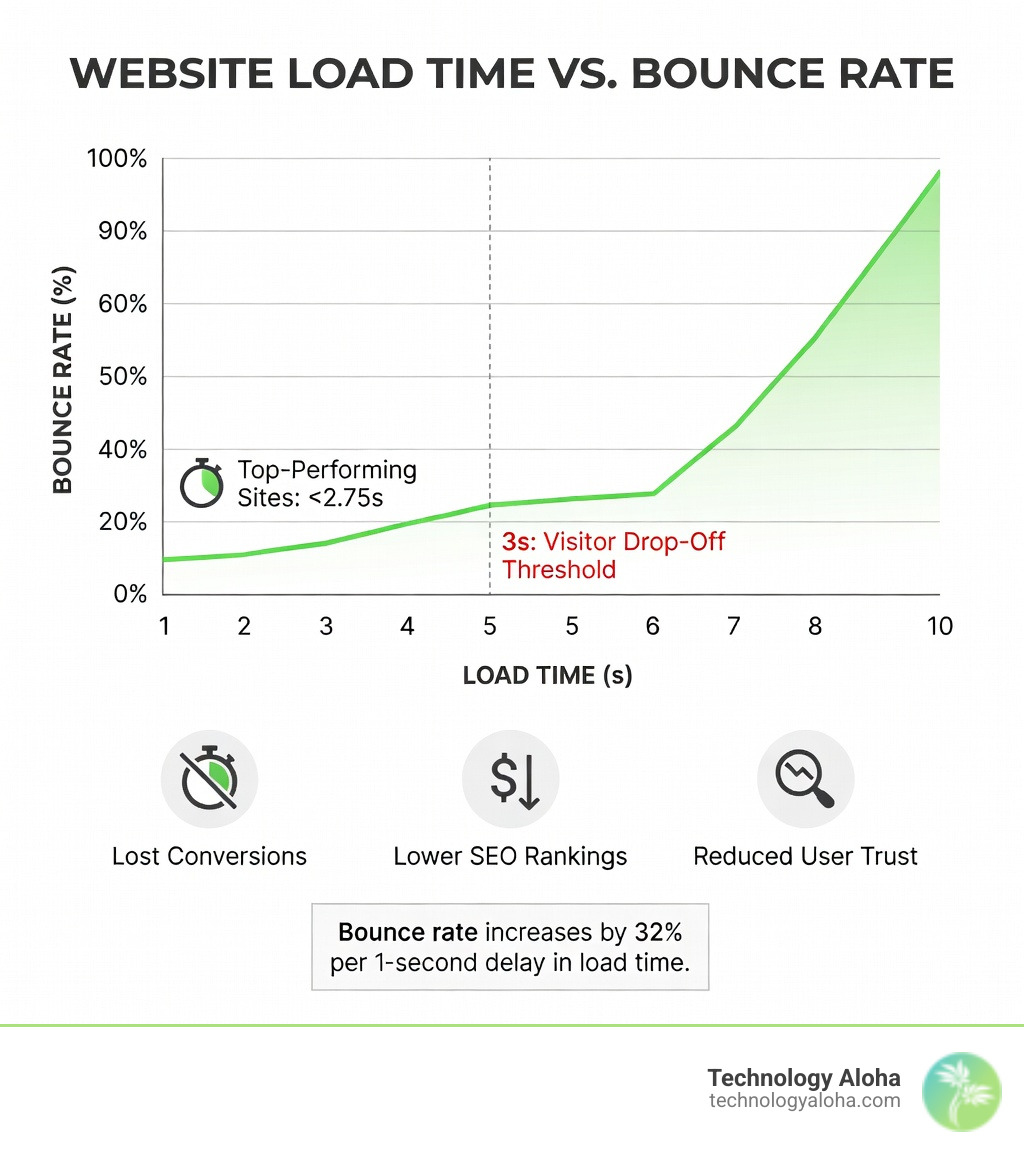
Your website has less than 3 seconds to load before visitors leave. That’s not a guideline — it’s a business reality.
Every extra second your page takes to load costs you visitors, conversions, and search rankings. Google uses real-world speed data as a ranking factor. Slow pages rank lower. And even if someone finds you, a sluggish experience sends them straight to a competitor.
The good news? Most slow websites share the same handful of problems — and those problems are fixable.
Page weight (the total size of everything your page loads) is the single biggest factor in load time. Heavy images, bloated code, and too many scripts pile up fast, especially on mobile connections.
This guide walks you through 23 proven techniques to make your website measurably faster — from quick wins you can do today to deeper infrastructure improvements.
I’m Jillyn Dillon, founder of Technology Aloha, and I bring a systems engineering and competitive strategy background to every aspect of digital marketing, including site speed optimization — because a fast website isn’t just a technical checkbox, it’s a strategic advantage. Let’s dig in.
Understanding Core Web Vitals and Performance Metrics
When we talk about “speed,” we aren’t just talking about a stopwatch. We are talking about how a user perceives your site. To standardize this, Google introduced Core Web Vitals—a set of specific metrics that measure the real-world user experience for loading performance, interactivity, and visual stability.
To truly learn about Web Performance, you need to understand these three pillars:
- Largest Contentful Paint (LCP): This measures loading performance. To provide a good user experience, LCP should occur within 2.5 seconds of when the page first starts loading. It marks the point when the main content has likely loaded.
- First Input Delay (FID) / Interaction to Next Paint (INP): These measure interactivity. FID tracks the time from when a user first interacts with your site (clicks a link, taps a button) to the time the browser responds. INP is the newer, more comprehensive metric that observes the latency of all interactions a user has with the page.
- Cumulative Layout Shift (CLS): This measures visual stability. Have you ever tried to click a button, only for the page to jump and cause you to click an ad instead? That’s a bad CLS. You want a score of 0.1 or less.
Beyond these, we also look at Time to First Byte (TTFB)—how long it takes for the server to send the first bit of data—and DNS lookup times. If these foundational numbers are high, no amount of front-end polishing will save you. This is why professional website maintenance is so vital; it ensures your underlying systems stay healthy.
Lab Data vs. Field Data: Which One Matters?
When you test your site, you’ll see two types of data. Understanding the difference is key to a successful site speed optimization strategy.
| Metric | Lab Data | Field Data |
|---|---|---|
| Source | Simulated environment (Lighthouse) | Real users (Chrome User Experience Report) |
| Purpose | Debugging and testing new changes | Measuring actual SEO and ranking impact |
| Connectivity | Fixed, usually high-speed | Varies (3G, 4G, 5G, Wi-Fi) |
| Timeline | Instant snapshot | 28-day rolling average |
While Lab Data is great for checking if your latest update worked, Field Data is what Google actually uses for rankings. Don’t panic if your lab score isn’t a perfect 100 as long as your field data shows your real visitors are having a fast experience.
Measuring Success with PageSpeed Insights and Lighthouse
To start your journey, you need the right diagnostic tools. The gold standard is PageSpeed Insights, which combines both lab and field data into one report.
If you are a developer or a “DIY-er,” you can also use Google Lighthouse, which is built directly into the Google Lighthouse section of Chrome DevTools. It provides a detailed breakdown of what is slowing you down, from oversized images to unused JavaScript.
Real-user monitoring (RUM) is the final piece of the puzzle. By tracking how actual people in Hawaii or across the globe experience your site, you can identify device-specific issues that a simulated test might miss.
Image and Media Optimization Strategies
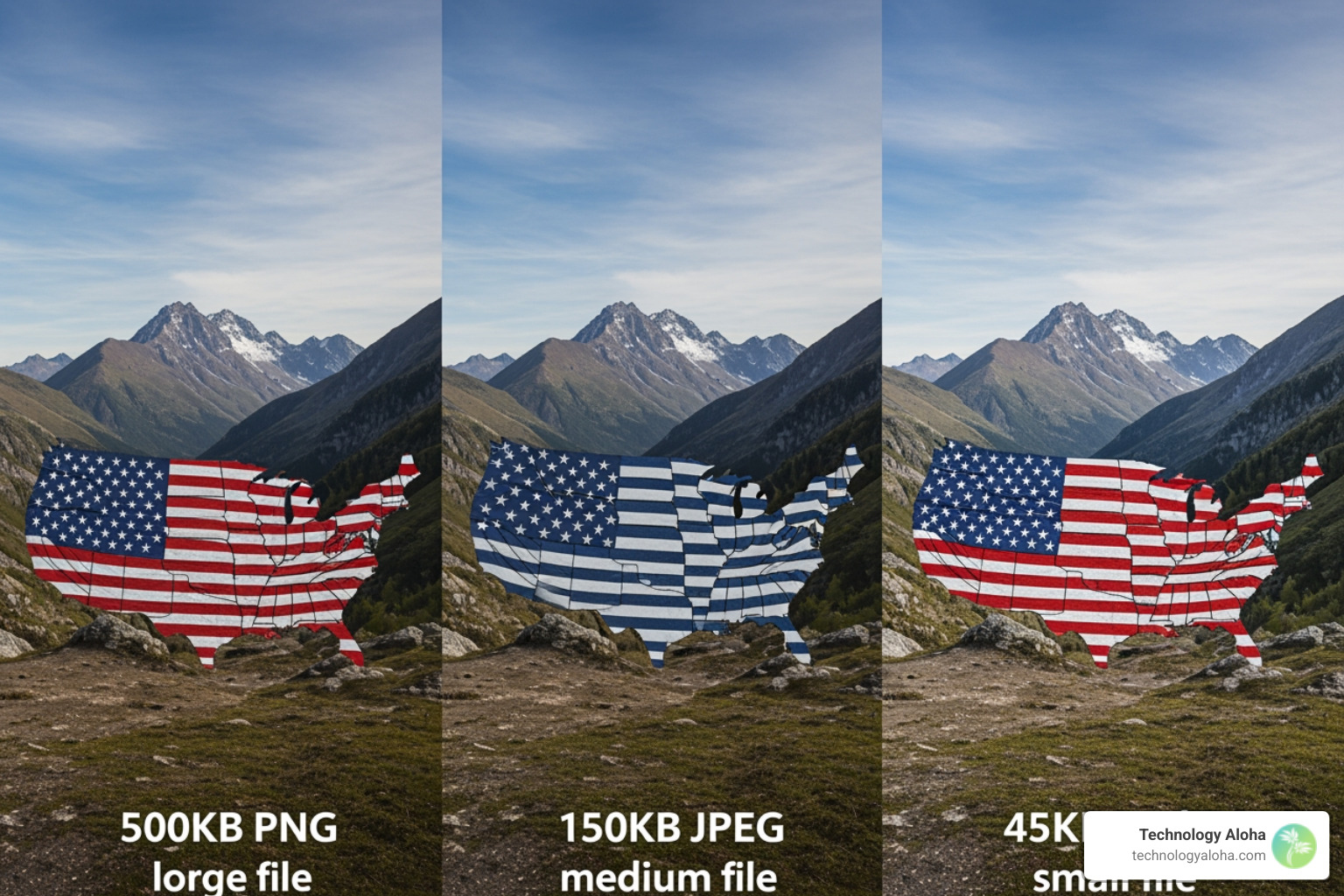
Images are almost always the heaviest part of a webpage. If you haven’t touched your images, you’re likely forcing your visitors to download massive files they don’t need.
One of the most effective site speed optimization techniques is switching to the WebP format. WebP images are roughly 1.5 times faster to load than JPEGs and a staggering 2.5 times faster than PNGs, all while maintaining high visual quality.
Compression and Responsiveness
Don’t just upload a photo straight from your camera. Use “lossy” compression to strip out data that the human eye can’t even see. Tools like Tiny PNG and Compress JPEG are fantastic for this.
Furthermore, you should implement:
- Lazy Loading: This tells the browser: “Don’t download the images at the bottom of the page until the user actually scrolls down to them.”
- Responsive Images: Use the
srcsetattribute to serve smaller images to phone users and larger ones to desktop users. There’s no reason to send a 4000-pixel wide image to an iPhone. - Decoding Async: Adding
decoding="async"to your image tags allows the browser to continue processing the rest of the page while the image decodes in the background.
Implementing Site Speed Optimization for WordPress
WordPress is the world’s most popular CMS, but it can get “heavy” quickly. Between themes and plugins, it’s easy to end up with a slow site.
To achieve website speed optimization on WordPress, we recommend an all-in-one solution like NitroPack. It’s incredibly effective—90.3% of NitroPack-optimized websites load in under 2.75 seconds. It handles caching, image optimization, and code minification in one go.
If you prefer a more “modular” approach, you can use a combination of:
- Autoptimize: For shrinking your CSS and JS files.
- Imagify: For automated image compression and WebP conversion.
- WP Rocket: For advanced caching layers.
Be careful of plugin bloat. Every plugin you add is another “voice” shouting for the server’s attention. Regularly perform a database cleanup to remove old post revisions and “junk” data that slows down your queries.
Advanced Site Speed Optimization for Code and Assets
Once the images are handled, it’s time to look at the code. Minification is the process of removing every unnecessary character from your code—spaces, comments, and line breaks. To a human, it looks like a mess; to a computer, it’s a streamlined set of instructions that loads much faster.
Defer, Async, and Preloading
When a browser encounters a script, it often stops everything else to download and run it. This is called “render-blocking.” To fix this, you should author fast-loading HTML pages by using the defer or async attributes on your scripts.
- Async lets the script download in the background and run the moment it’s ready.
- Defer waits until the entire page has finished parsing before running the script.
You can also use Resource Hints like rel="preload" for your most important assets (like your logo or main font) and rel="preconnect" for third-party services like Google Analytics. This tells the browser to start making those connections before it even needs them.
Finding the right balance is key. At Technology Aloha, we focus on balancing SEO and user experience because a site that is technically fast but impossible to use won’t help your business grow.
Quick Wins for Immediate Site Speed Optimization
Not every optimization takes weeks of development. If you need a boost now, check these off your list:
- Gzip and Brotli Compression: These are server-level settings that “zip” your files before sending them to the user. Brotli is the newer standard and often offers better compression than Gzip.
- Use System Fonts: Instead of making a user download a custom font file, use fonts already on their device (like Arial or Helvetica). If you must use web fonts, use
font-display: swapto show a fallback font until the custom one loads. - Inline SVG: For small icons and logos, use SVG code directly in your HTML. This saves an extra HTTP request.
- Critical CSS: Identify the CSS needed to style the part of the page a user sees first (“above the fold”) and inline it directly into the HTML.
- Follow PageSpeed Insights Rules: Check the PageSpeed Insights Rules for specific, automated suggestions tailored to your site.
Infrastructure, Caching, and Global Delivery
Your website lives on a server. If that server is in New York and your customer is in Kahului, the data has to travel thousands of miles. This creates “latency.”
A Content Delivery Network (CDN) solves this by storing copies of your site on a global network of servers. When a visitor arrives, the CDN serves the site from the node closest to them.
To truly master understanding CDNs, you also need to understand Browser Caching. By setting a “Time to Live” (TTL) for your static files, you tell the visitor’s browser: “Keep this logo for 30 days so you don’t have to ask me for it again.”
Finally, don’t overlook your hosting response time. If your host takes 1 second just to acknowledge a request, you’ve already lost the 3-second window. We always recommend high-quality hosting with fast DNS resolution to ensure your foundation is solid.
Maintaining Performance and Business Growth
Site speed optimization isn’t a “one and done” project. It’s a habit. As you add new blog posts, products, or marketing scripts, your site will naturally start to slow down. This is what we call “performance debt.”
To combat this, we recommend setting a performance budget. For example, you might decide that your homepage should never exceed 2MB in total size or that your LCP must always stay under 2.5 seconds. If a new feature pushes you over that budget, you have to optimize something else to make room.
Regularly check your fast load times metrics to ensure you aren’t slipping. Why does this matter? Because speed is directly tied to your bottom line.
When your site is fast, users stay longer, click more, and buy more. When you consider website maintenance costs, a slow site is often more expensive in the long run due to lost revenue and wasted ad spend.
Frequently Asked Questions about Site Speed
What is a good PageSpeed Insights score?
Generally, a score of 90 or above is considered “Good.” Scores between 50 and 89 “Need Improvement,” and anything below 50 is “Poor.” However, don’t ignore the Core Web Vitals assessment; passing those real-world metrics is often more important than the numerical score itself.
How does site speed affect my Google ranking?
Since 2021, Google has used Core Web Vitals as an official ranking signal. While great content is still king, if two sites have equally good content, Google will almost always rank the faster, more stable site higher.
Why is my mobile speed lower than desktop?
Mobile devices usually have slower processors than desktops and often rely on less stable cellular networks. Additionally, many sites serve the same heavy assets to both, which punishes mobile users. Mobile-first site speed optimization is essential for modern SEO.
Conclusion
Building a fast website is about more than just technical scores; it’s about respecting your visitors’ time. In an era where everyone is in a hurry, providing a “blazing fast” experience is one of the best ways to build trust and authority.
At Technology Aloha, we specialize in data-driven optimization that doesn’t just make your site faster—it makes it more effective. From sustainable design to high-conversion layouts, we ensure your digital presence is built for growth.
Ready to leave the “slow lane” behind? Explore our website speed optimization services and let’s get your site performing at its peak. Together, we can build a faster, better web for your customers in Hawaii and beyond.