Set up Gift Aid on your donation form
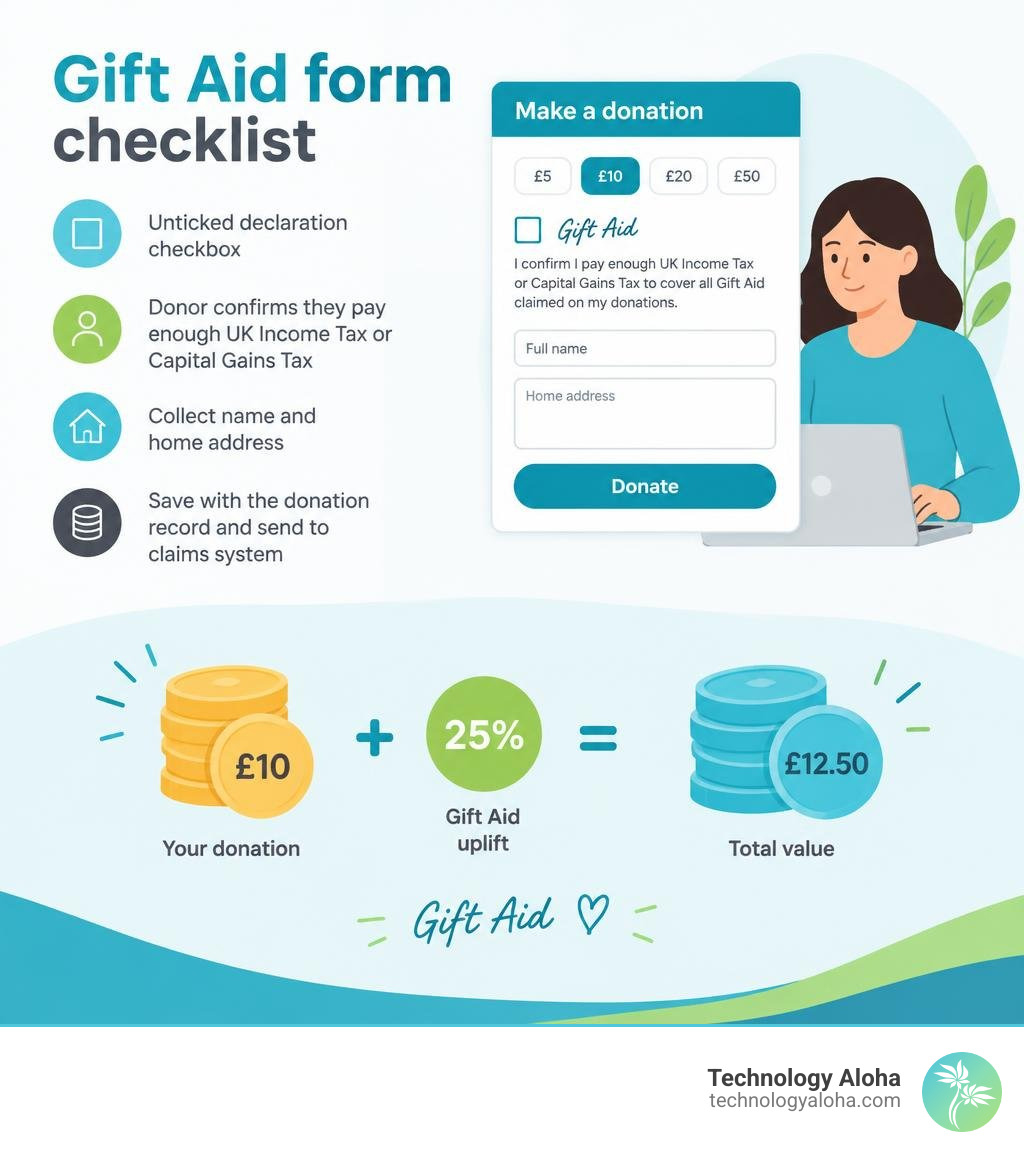
To add Gift Aid to your donation form, show an unticked declaration checkbox, ask donors to confirm they pay enough UK Income Tax or Capital Gains Tax, and collect their name and home address. Save the declaration with the donation record, then send eligible gifts to your claims system. Keep the checkbox separate from marketing consent.
For eligible donations, Gift Aid lets your charity claim an extra 25p for every £1 given. That turns a £10 gift into £12.50—without asking the donor to give more.
Core HMRC Compliance and Declaration Rules
To claim that 25% uplift legally, your organization must satisfy HM Revenue and Customs (HMRC) standards. A valid Gift Aid claim requires that the individual donor pays sufficient UK Income Tax or Capital Gains Tax in the relevant tax year to cover all Gift Aid claimed across all charities they support. If they pay less tax than the amount reclaimed, the responsibility falls on the donor to pay the difference back to HMRC.
HMRC permits claims on donations made up to four years prior to the end of the financial year in which the gift was received. Building your digital checkout flow around these statutory rules prevents expensive audit clawbacks. You can master user-friendly giving layouts by reading How to Create Donation Forms: 7 Methods That Guarantee Results.
Essential Data Fields for Valid Declarations
Every valid digital Gift Aid declaration requires specific constituent data points. If any field is missing or formatted incorrectly, HMRC Charities Online will reject the entire batch schedule.
The mandatory inputs include:
- Full donor name, including title, first name or initial, and surname.
- Full physical home address (workplace or business addresses disqualify personal Gift Aid).
- A valid UK postcode.
- An explicit confirmation stating that the donor wants Gift Aid applied to this gift, past gifts within the statutory window, or future gifts.
- A timestamp recording when the declaration was submitted.
The table below contrasts standard Gift Aid rules with the Small Donations Scheme:
| Feature | Standard Gift Aid | Small Donations Scheme (SDS) |
|---|---|---|
| Declaration Required? | Yes, explicit donor declaration required | No declaration needed |
| Payment Method | Card, Direct Debit, cheque, bank transfer, cash | Cash or contactless card payments only |
| Per-Donation Limit | No statutory upper limit | Maximum of £30 per individual donation |
| Annual Scheme Cap | Unlimited (based on eligible donations) | Maximum claim of £2,000 per tax year |
| Donor Identity Data | Full name, home address, and postcode | Anonymous (no donor record required) |
Under HMRC guidelines for the Small Donations Scheme, smaller cash and contactless card gifts provide streamlined supplemental income without requiring extensive identity capture.
Best Practices for Donation Form Gift Aid Integration
Seamless donation form gift aid integration balances rigorous statutory compliance with frictionless user experience.
First, never pre-tick the Gift Aid declaration box. Under UK regulations, consent must be an active opt-in choice made by the donor.
Second, isolate Gift Aid consent from general newsletter subscriptions and marketing communications. Blurring these permissions violates GDPR standards and risks invalidating your tax declarations. You can refine your visual hierarchy using principles from The Art of High-Converting Lead Capture Page Design.
Third, use conditional visibility. If a donor indicates they are an international resident not paying UK tax, conditionally suppress the Gift Aid declaration to eliminate cognitive load and avoid accidental invalid claims.
Fourth, trigger an automated confirmation email immediately following submission. This receipt must clearly reiterate the declaration text, specify the claimed donation amount, and provide instructions on how the donor can cancel the declaration if their tax status changes.
Step-by-Step Donation Form Gift Aid Integration Workflow
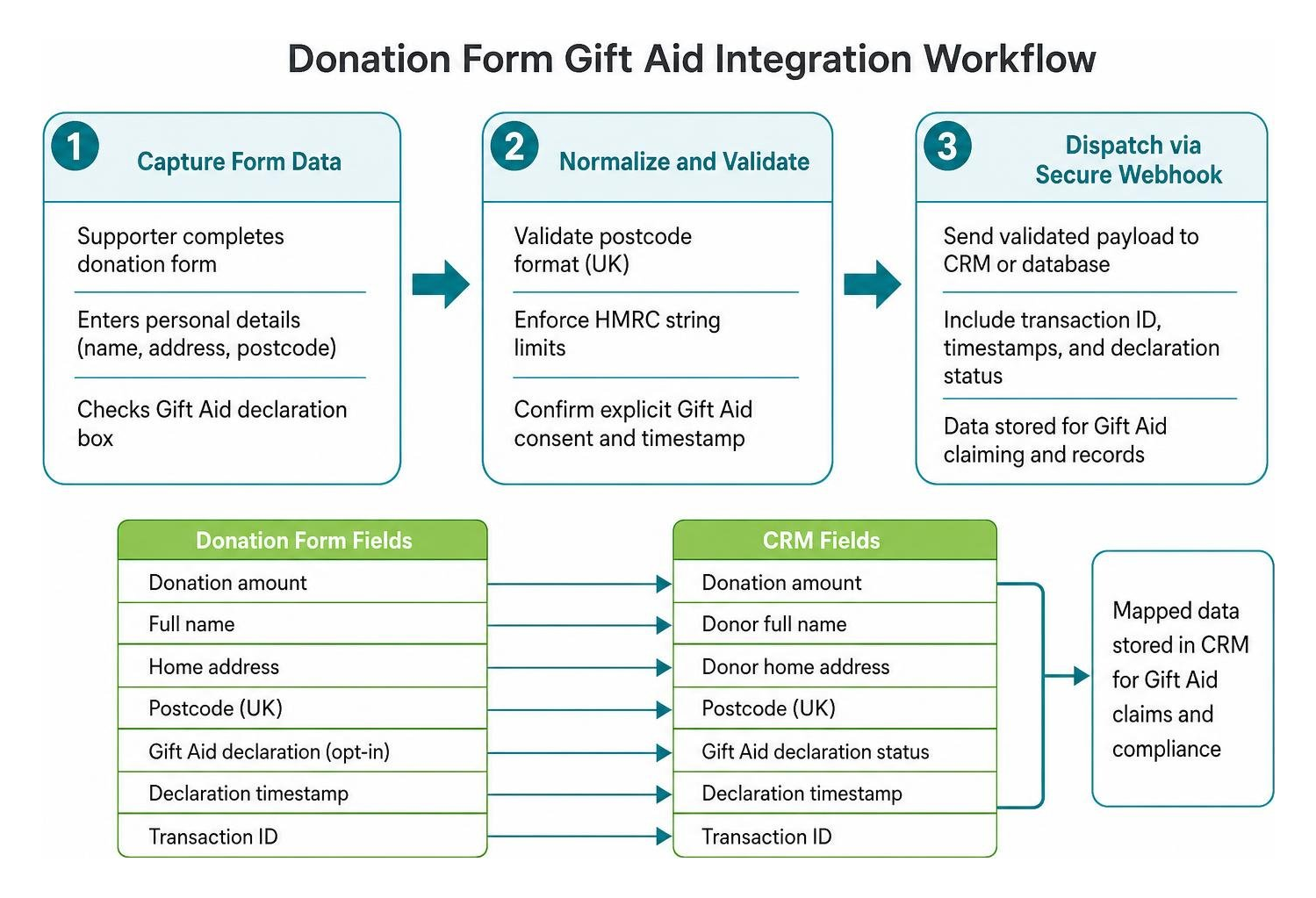
Connecting front-end web forms to back-end claim systems removes manual data entry errors.
- Capture Form Data: The supporter selects their giving amount, enters personal billing details, and checks the Gift Aid declaration box on your website.
- Normalize and Validate: Front-end validation scripts enforce HMRC string limits and verify postcode formatting before the transaction executes.
- Dispatch via Secure Webhook: The form payload dispatches donor details, transaction IDs, timestamps, and declaration states to your fundraising CRM or database.
- Compile Claim Schedules: The CRM stages eligible transactions into an active claim register, filtering out corporate donations or non-qualifying funds.
- Direct HMRC Gateway Transmission: The system generates a compliant submission and transmits it directly to HMRC Charities Online via authorized credentials.
Review your digital checkout elements systematically by checking your setup against Nail Your Launch with This Conversion Checklist.
Technical Configuration for Donation Form Gift Aid Integration
To establish an automated data pipeline, configure your platform credentials properly. Enter your charity’s Government Gateway user ID, password, and HMRC Gift Aid reference within your CRM settings.
Map form fields directly to your CRM’s constituent schema:
- Map personal title, first name, and last name to standard contact records.
- Route street address and postcode to primary residential location fields.
- Route the Gift Aid checkbox value (
true/false) to activate a formal declaration record linked to the constituent timeline.
Run test API calls in sandbox mode before deploying changes live. Ensure your servers whitelist required outgoing IP addresses so that background webhooks transmit reliably.
Handling Offline Declarations and Small Donations Scheme
Digital platforms should also accommodate offline and verbal declarations. When supporters pledge gifts over the phone, record an oral declaration within your CRM timeline. HMRC requires sending a written confirmation letter to the donor within 30 days detailing what was agreed and noting that they must notify you if they do not pay sufficient tax.
For community events or contactless tap-to-give kiosks, utilize the Small Donations Scheme (SDS). The SDS enables charities to claim a 25% top-up on cash donations of £30 or less and contactless card donations of £30 or less without individual declarations, subject to a £2,000 annual claim cap per tax year. Configure your donation platform to categorize contactless giving station receipts under dedicated SDS funds to prevent mixing them with standard claimed gifts.
Preventing Common Submission Errors and Audit Failures
Submitting unvalidated Gift Aid claims directly to HMRC often results in whole-batch rejections. Proactive field validation stops errors before they reach Government Gateway servers.
To maximize yield across all donation funnels, discover How to Build Pages That Convert Using Real Data.
Address and Character Validation Standards
HMRC submission schemas enforce strict character limitations:
- Taxpayer Title: Up to 4 characters with no punctuation (e.g., “Mrs” is valid; “Mrs.” will fail validation).
- Forename and Surname: Maximum of 35 characters each.
- Address Line 1: Up to 40 characters maximum containing house number and street name.
- Postcode: Validated UK format (e.g., SW1A 1AA).
Ensure your forms strip out trailing spaces, special symbols, and illegal punctuation prior to saving declarations.
Secure Storage and Audit Trails
HMRC requires charities to maintain auditable records of all Gift Aid declarations throughout the statutory retention period (at least six years after the end of the tax year they relate to). Your database must store immutable logs showing the declaration date, exact wording presented to the donor, IP address, and transaction association.
If a donor revokes consent or notifies you of an over-claim, use automated reversal workflows within your CRM. This creates an adjustment entry on your next HMRC schedule, subtracting the overpaid amount cleanly from your payout.
Frequently Asked Questions About Gift Aid Integration
Who should charities contact if an HMRC submission fails?
If an electronic submission fails due to gateway issues or credential mismatches, verify your Government Gateway ID and 12-character submission password first. If technical errors persist, contact the HMRC Charities Helpline directly at 0300 123 1073.
How do multi-currency donations work with Gift Aid?
Gift Aid can only be claimed in pounds sterling (GBP). If an overseas or international donor makes a donation in a foreign currency (such as USD or EUR), your platform must record the exact sterling equivalent received in your bank account on the date of settlement. The donor must still pay sufficient UK Income Tax or Capital Gains Tax to qualify.
What is the Small Donations Scheme claim limit in 2026?
Charities can claim up to £2,000 per tax year under the Small Donations Scheme on eligible cash and contactless card gifts of £30 or less without collecting individual donor declarations.
Conclusion
A well-executed Gift Aid workflow elevates your fundraising potential by securing an effortless 25% boost on every eligible contribution. By implementing clean form architecture, automated CRM field mapping, and rigorous data validation, your team eliminates tedious paperwork while maintaining full HMRC compliance.
At Technology Aloha, we provide specialized, scalable digital infrastructure for food banks and nonprofits, closing the survival gap through virtual donation platforms and high-conversion, user-centered websites. We bring deep expertise in food bank operations, award-winning nonprofit design, and a relentless focus on reducing donation friction to increase both donor generosity and recipient access.
To explore how high-performing digital platforms transform your organization’s mission, read The Complete Guide to High-Conversion Websites.